Enterprise Work Management
Enterprise work management: How to create one operating system for your whole organisation

Date
Author
If your organisation is in a period of rapid growth, you definitely don’t have a productivity problem, but you probably do have a visibility problem.
Work is happening across departments, tools, spreadsheets, email threads, and Slack channels. Projects are tracked in one system, client communication lives in another, time data sits in a third, and reporting requires someone to manually pull numbers from all of them every Monday morning. Nobody has a complete picture. Leadership chases updates. Teams duplicate work. Decisions get made on incomplete information.
Enterprise work management is the practice of fixing that. Not by adding another tool on top of the existing pile, but by designing one connected system that brings processes, people, workflows, automation, and visibility together across the organisation.
This guide explains what enterprise work management actually involves, why most approaches fail, and how to build an operational system that scales.
Why you need workplace enterprise management
Enterprise work management (EWM) is the discipline of planning, executing, and coordinating all work across an organisation through a unified system. It goes beyond tracking individual projects or managing team task lists. It connects the work of multiple departments into a single architecture with consistent processes, shared visibility, and coherent reporting.
The distinction matters because most organisations start with project management and assume it scales. It doesn't. Project management handles the work inside a project. Enterprise work management handles the work across the organisation: how projects relate to each other, how resources are allocated across departments, how handoffs happen between teams, and how leadership sees the whole picture without asking for it.
Why organisations outgrow project management
This transition usually happens somewhere between 20 and 100 employees, and the trigger is almost never "we need better task tracking."
The real triggers look like this:
Leadership can no longer see what everyone is working on without scheduling meetings to find out.
Cross-department handoffs (sales to delivery, marketing to operations, client success to project management) happen through email and Slack rather than through a defined process.
Different departments use different tools, different naming conventions, and different definitions of "done."
Reporting requires manual assembly from multiple sources, so it either arrives late, arrives incomplete, or doesn't happen at all.
What worked informally at 10 people starts breaking at 30. By 50, the cracks are making a measurable difference, everyday.
The instinct is usually to buy more software. A better PM tool. A dashboard layer. An automation platform.
But adding another tool to a fragmented environment doesn't reduce fragmentation. It adds another system people need to learn, maintain, and eventually work around.
How enterprise work becomes fragmented
Fragmentation is something that accumulates over time, so subtly that your team don’t really notice it.
A sales team adopts a CRM. Marketing uses a different project management tool. Operations tracks deliverables in spreadsheets. Finance runs its own reporting. Each team picks the tool that works best for their specific function, and for a while, that's fine.
The problems emerge at the seams: where one team's output becomes another team's input. The CRM doesn't talk to the project management tool. A won deal doesn't automatically become a delivery project. The client's requirements live in an email thread that the delivery team never sees. Status updates happen in one system but leadership checks a different one.
Over time, the organisation develops an unofficial operating system made of copy-pasting between tools, verbal handoffs, and institutional knowledge held by specific people. When those people are unavailable, things get missed.
This is the problem enterprise work management is designed to solve.
What a true enterprise work management system should accomplish
An effective enterprise work management system is not a single piece of software. It's a designed architecture that achieves several things simultaneously.
Centralised visibility. Leadership can see what's happening across departments, projects, and teams without manually assembling information. Dashboards, workload views, and portfolio reports are available on demand rather than produced weekly by someone's manual effort.
Standardised core workflows. The stages a piece of work moves through, the handoffs between teams, the definitions of status, the required approvals, and the escalation paths should be consistent enough that anyone can understand what's happening and where a project sits, regardless of which department it belongs to.
Automation of repetitive operational work. Task creation, assignment routing, status notifications, deadline reminders, recurring processes, and data movement between systems should happen automatically where the workflow is predictable.
Integration with existing systems. Not every tool needs replacing. CRMs, finance systems, and specialist industry tools often need to remain. The work management system should connect to them so data flows where it needs to without manual copying.
Governance and consistency. Naming conventions, workspace structure, permission models, and automation documentation prevent the system from degrading over time.
Adoption. The system only works if people use it. Training, change management, and thoughtful design of the user experience are as important as the technical configuration.
One architecture does not mean one identical workflow
This is an important point that most enterprise work management content misses.
Different departments genuinely need different processes. Marketing work doesn't move through the same stages as client delivery. HR onboarding doesn't follow the same path as product development. Forcing every team into one identical workflow creates resistance and workarounds.
The solution is architectural consistency with workflow flexibility. The overall hierarchy, reporting structure, naming conventions, and handoff mechanisms should be consistent. Within that architecture, individual teams can operate with the workflows that suit their specific work. A marketing team might use Kanban boards and content calendars. A delivery team might use list views with dependencies and time tracking. Both sit inside the same organisational structure, both report to the same dashboards, but neither is forced to work in a way that doesn't fit.
This balance between standardisation and flexibility is one of the hardest things to get right, and it's where most out-of-the-box software configurations fall short. It requires process design, not just platform setup.
Process before platform
This is the single most important principle in enterprise work management, and it's the one most organisations skip.
Before evaluating any software, selecting a vendor, or configuring a workspace, you need to map how your organisation actually operates. Not the version in the strategy document. The real sequence, including the workarounds, the informal handoffs, the processes that exist only in certain people's heads.
Practically, that means documenting:
What triggers each type of work.
Who does it.
What stages it moves through.
Where it goes next.
Who needs visibility.
What decisions are required.
What data needs to travel with the work.
Where things currently get stuck, dropped, or delayed.
This audit consistently reveals that the operational problems predate the tooling. Teams aren't struggling because the software is wrong. They're struggling because the process was never designed, only evolved.
At Sharpflow, this is the first stage of every engagement. We call it scoping, and nothing gets built until it's complete. The reason is practical: automating or configuring a platform around a broken process just produces broken results faster. The strongest enterprise work management implementations we've delivered, including BTW Creative's operational overhaul that reduced internal admin by 48%, started with process mapping weeks before anyone opened ClickUp.
A practical framework for building an enterprise operating system
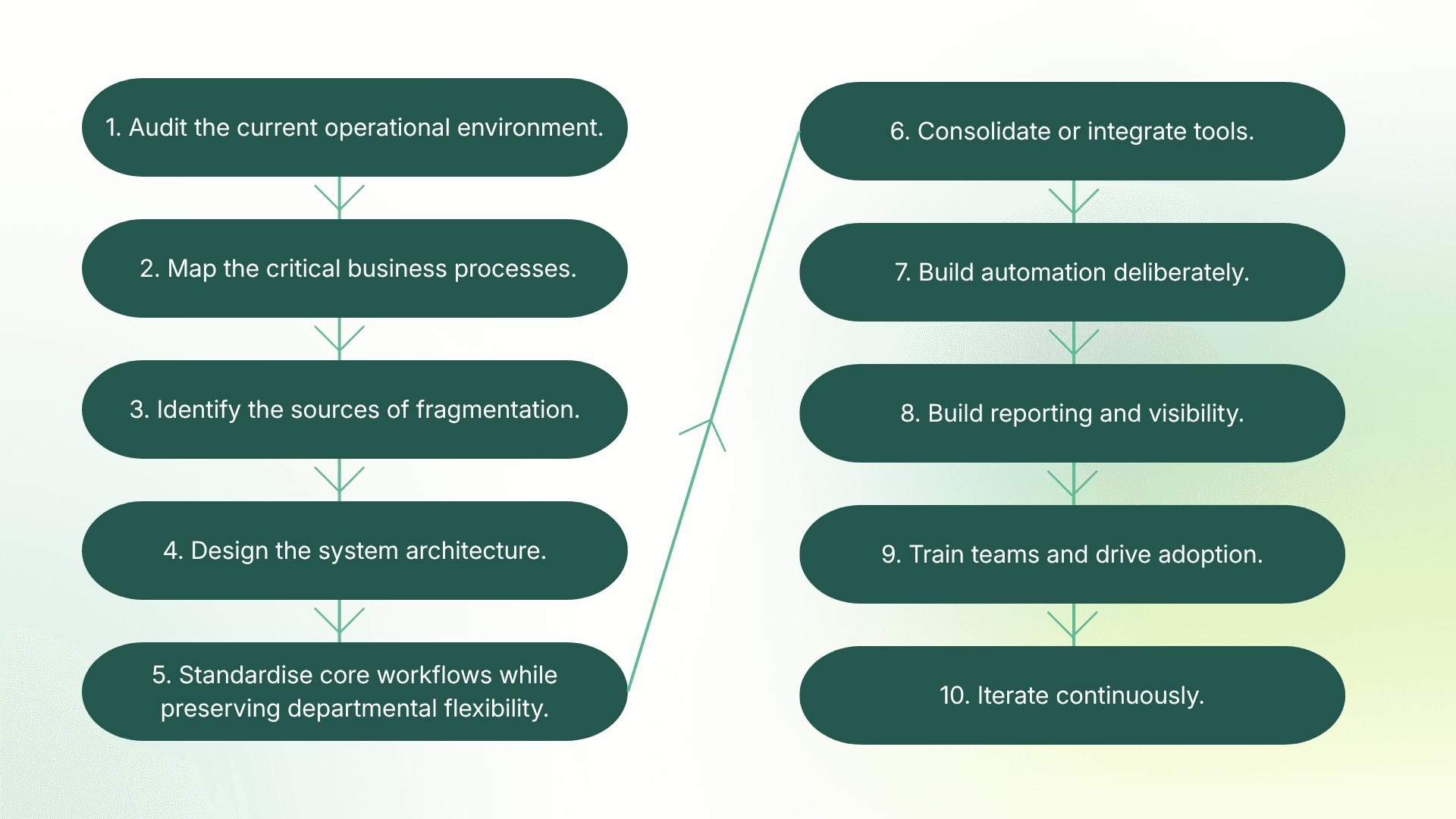
Based on our experience across 100+ implementations, here's the sequence that consistently works:
1. Audit the current operational environment. List every tool, spreadsheet, communication channel, and manual process in use. Identify where teams overlap, where data gets duplicated, and where information falls between systems.
2. Map the critical business processes. Focus on the workflows that run the business: sales to delivery handovers, client onboarding, project execution, reporting, and recurring operations. Document what actually happens, not what should happen.
3. Identify the sources of fragmentation. Where do handoffs break? Where does data live in more than one place? Where does someone copy-paste between tools? Where does leadership lack visibility?
4. Design the system architecture. Define how work will be organised: the hierarchy (departments, clients, projects), the status definitions, the custom fields, the naming conventions, the permission model. This is the blueprint.
5. Standardise core workflows while preserving departmental flexibility. Build the shared architecture, then design specific workflows for each team within that structure. Enforce what needs to be consistent. Allow what should be flexible.
6. Consolidate or integrate tools. Decide what gets replaced by the work management platform, what stays but connects via integration, and what gets eliminated entirely. Not every tool needs replacing, but every tool needs a clear role.
7. Build automation deliberately. Automate the genuinely repetitive operational work: task creation, assignment routing, status notifications, recurring processes. Resist the temptation to automate everything. Ten well-chosen automations produce more value than a hundred poorly documented ones.
8. Build reporting and visibility. Configure dashboards for leadership (strategic health), managers (operational detail), and individual contributors (personal workload). If the data is in the system, the reports should build themselves.
9. Train teams and drive adoption. Train different roles differently. Leadership needs dashboard visibility. Managers need workflow control. Individual contributors need to know where their work lives. Generic training serves none of them well.
10. Iterate continuously. The system should evolve as the business grows. What worked at 30 people will need refinement at 60. Assign clear ownership of the system and schedule regular reviews.
Where automation fits (and where it doesn't)
Automation is one of the most valuable components of enterprise work management, and one of the most commonly misused.
The highest-value automations are the ones that remove genuinely repetitive operational work: creating projects from templates when deals close, routing tasks to the right team based on a field value, sending deadline reminders without anyone remembering, updating statuses across related work items, generating recurring tasks on schedule.
The danger is over-automation. We've audited enterprise workspaces with hundreds of automations, many undocumented, some conflicting, and nobody on the team who understood what was running or why. Automation should simplify operations, not create a second layer of complexity that requires its own management.
The practical rule: if an automation removes manual work from a repeatable process and someone can explain what it does and why, it belongs. If nobody can explain it, it needs documenting or removing.
Where AI fits (and where it doesn't)
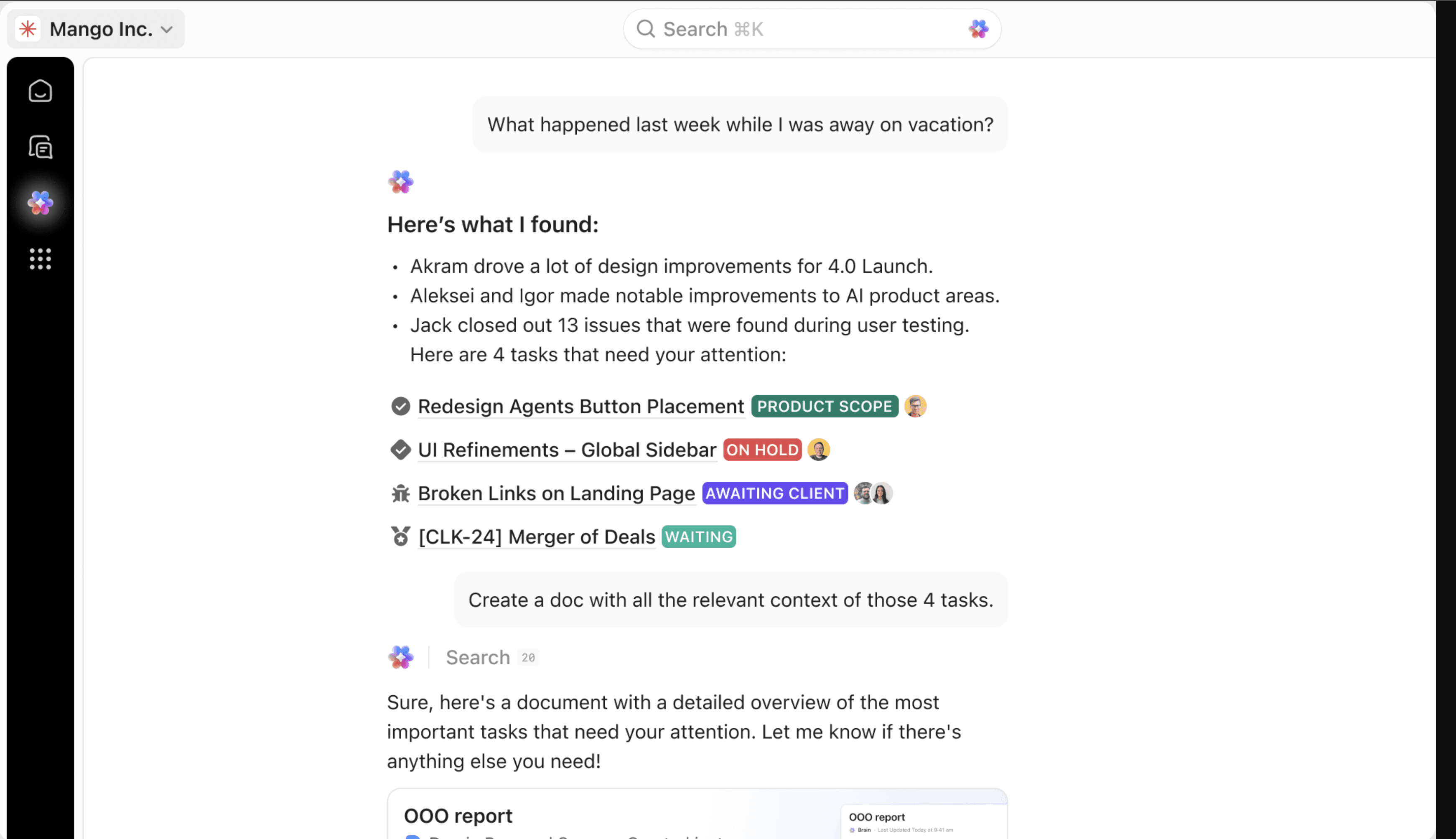
AI has become part of the enterprise work management conversation, and the practical applications are genuine. AI can summarise project status from live workspace data, answer natural language questions about who's working on what, draft status updates, classify incoming requests, extract information from documents, and run background agents that monitor for stalled work.
The key distinction is between AI and conventional automation. Most enterprise workflows don't need artificial intelligence. They need deterministic rules: when this happens, do that. AI adds value when the workflow requires interpretation, classification, summarisation, or contextual reasoning. Using AI where a simple trigger-based automation would suffice is more expensive, harder to debug, and less reliable.
The organisations getting real value from AI in their work management systems are almost always organisations that already have their process architecture and conventional automation sorted. AI amplifies operational maturity. It doesn't create it.
Integration decisions: consolidate, connect, or eliminate
Enterprise work management doesn't require putting everything into one platform. That's a common misunderstanding.
The decision for each existing tool should be one of three:
Consolidate into the work management platform. If a tool is lightly used, expensive relative to its value, or duplicates functionality the work management platform already provides (docs, basic CRM, time tracking, internal chat), replacing it reduces cost and context switching.
Connect via integration. If a tool is deeply embedded in a specific function (Salesforce for sales, Xero for finance, a specialist industry tool), it should remain but connect to the work management platform so data flows where it needs to without manual copying.
Eliminate entirely. Some tools exist only because nobody made a decision to retire them. If a tool is redundant, unused, or adds more overhead than value, removing it simplifies the environment.
At Sharpflow, we help businesses make these decisions during the scoping phase.
We regularly connect ClickUp to Salesforce, HubSpot, Google Workspace, Slack, and other tools our clients depend on.
As one client put it: "Sharpflow did a great job integrating our Salesforce and ClickUp systems." The goal isn't one tool for everything. It's one system that works.
The implementation gap
This is the part most enterprise work management articles skip entirely, because most are written by software vendors whose job ends at the sale.
The gap between selecting a platform and having a functioning operational system is where most enterprise work management initiatives fail. The architecture needs designing. The processes need mapping and sometimes redesigning. The automations need building, testing, and documenting. The integrations need configuring. The team needs training, not on the software's features, but on how their specific work moves through the new system. And someone needs to own the system after go-live, because workspaces degrade without governance.
This is the work we do at Sharpflow. We're an Official ClickUp Partner, and we've implemented operational systems for more than 100 teams across agencies, non-profits, construction firms, manufacturing companies, and professional services businesses. We map processes first, design the architecture, build the workspace, automate the repeatable work, configure the reporting, train the team, and provide ongoing support as the business evolves.
The technology is the smaller half of the equation. Getting the design right and the people using it is where the real value sits.
Frequently asked questions
What is enterprise work management?
Enterprise work management is the practice of planning, executing, and coordinating all work across an organisation through a unified system. It goes beyond project management by connecting cross-departmental workflows, standardising processes, and providing centralised visibility into all operational activity.
How is enterprise work management different from project management?
Project management handles the work inside a single project. Enterprise work management handles the work across the organisation: how projects relate to each other, how resources are allocated between departments, how handoffs happen, and how leadership sees the whole picture.
What's the biggest mistake organisations make with enterprise work management?
Buying a platform before mapping their processes. Software configured around a broken process just produces broken results faster. The strongest implementations start with process mapping and architectural design before any technology is configured.
Do we need to replace all our existing tools?
No. Some tools should be consolidated into the work management platform, some should remain and connect via integration, and some should be eliminated. The decision depends on how deeply embedded each tool is and whether it duplicates functionality the work management system provides.
How long does it take to implement enterprise work management?
or most growing organisations, a foundational implementation takes 6 to 12 weeks depending on complexity. This includes process mapping, architecture design, workspace build, automation setup, training, and go-live. The system then evolves continuously as the business grows.
Can ClickUp work as an enterprise work management platform?
Yes. ClickUp's five-level hierarchy, native time tracking, 1,000+ integrations, automation engine, dashboards, and AI capabilities make it well suited for enterprise work management. The platform provides the flexibility needed for different departmental workflows within a consistent organisational architecture.
Ready to build one operating system for your business?
If your organisation has outgrown the point where individual teams can manage their own tools and processes independently, enterprise work management isn't optional. It's the difference between scaling with visibility and scaling with chaos.
The challenge isn't finding the right software. It's designing the right system, building it properly, and getting your team to use it.
That's what we do at Sharpflow Consulting. We map your operations, design the architecture, build the workspace, automate the repeatable work, and train your team. Process first, platform second.
Book a discovery call and we'll start by understanding how your business actually operates.


