Enterprise systems integration
Enterprise systems integration: How to connect your business tools into one operating system

Date
Author
Your business probably does not have a software shortage. It has a coordination problem.
Sales updates the CRM. Delivery waits for an email. Finance recreates the customer in a separate platform. Leadership relies on a spreadsheet to work out what is actually happening across the business.
The individual tools may work perfectly well on their own. The problem is that the complete process, from winning a customer through delivering the work and collecting payment, crosses multiple platforms, departments and owners. Nobody designed how those systems should work together.
Enterprise systems integration is the practice of fixing that. This article explains what it means, what should be connected, how the technical side works, and how to build connections without creating automation chaos.
What is enterprise systems integration?
Enterprise systems integration is the process of connecting separate business applications, data sources and workflows so information can move between them automatically and teams can complete end-to-end processes without repeated manual handoffs. It can connect systems such as CRM, project management, finance, customer support and communication platforms while allowing each system to retain its specialist role.
Enterprise integration goes beyond simply transferring data between two tools. It can also coordinate actions across several systems. A closed CRM opportunity can trigger a delivery project, a finance request, an onboarding workflow and a management update, all without someone manually copying information between platforms.
Enterprise integration does not always mean one application
There is an important distinction between forcing every function into one piece of software and creating one coordinated way of operating.
A CRM might remain responsible for opportunities and customer records. A finance platform may remain responsible for invoices and payments. A work management tool like ClickUp may coordinate delivery, ownership, deadlines and operational execution.
Integration connects these systems into a single operating process. The tools retain their specialist strengths. The team operates as though it is working in one system because the information flows where it needs to without manual copying.
Enterprise systems integration vs enterprise application integration
Enterprise application integration usually refers to connecting applications so they can exchange data and support shared workflows. Enterprise systems integration is the broader operational concept, encompassing applications, databases, processes, reporting and sometimes external systems.
API integration is one method used to create those connections. It is not the whole integration strategy.
Why disconnected business tools create more work as you grow
At five people, disconnected tools are manageable. Everyone knows where everything is. By twenty people, the coordination problems become structural.
Duplicate data entry. Customer, project, pricing or order information is repeatedly copied between systems. Every duplicate is a chance for inconsistency.
Broken departmental handoffs. Sales may consider a deal complete while operations still lacks the information required to begin delivery. The gap between "sold" and "started" is filled with emails, Slack messages and meetings.
Conflicting versions of the truth. The CRM, project platform, finance system and management spreadsheet may all show different statuses for the same customer or project. Nobody knows which version is correct.
Reporting delays. Leadership cannot see the full customer or project journey without combining several exports and manually reconciling data. Reporting becomes a weekly admin exercise rather than a live resource.
Lost context. Teams see individual tasks but not the customer, financial or operational context behind them. A delivery team working on a project may not know the contract value, the account owner or the customer's previous experience.
Manual coordination. Employees use email, Slack, Teams, WhatsApp or meetings to compensate for missing system connections. That coordination work is invisible but expensive.
Automation debt. Small, isolated automations accumulate without documentation or ownership. A field change in one system can silently break downstream processes nobody remembers building.
Poor foundations for AI. AI workflows require reliable access to relevant, governed business information. Connecting an AI tool to inconsistent or duplicated data only automates the confusion.
The problem is rarely that the business lacks software. The problem is that no one designed how the software should work together.
What should an integrated enterprise technology stack connect?
Rather than listing software categories, it helps to think about what information needs to move and where it should live.
CRM and sales
Leads, companies, contacts, opportunities, deal value, sales owner, expected close date and products or services purchased.
Project and work management
Delivery projects, tasks, deadlines, dependencies, workload, project status, risks and internal ownership.
Finance and billing
Quotes, purchase orders, invoices, payment status, costs, revenue and billing milestones.
Communication and collaboration
Notifications, approval requests, escalations, customer updates, internal conversations and meeting outcomes.
Documents and knowledge
Contracts, statements of work, briefs, standard operating procedures, customer assets and project documentation.
Reporting, analytics and AI
This layer should receive consistent information from the appropriate source systems rather than relying on manually maintained spreadsheets.
Business area | Example system of record | Information that should flow |
Sales | CRM | Customer, opportunity and deal information |
Delivery | ClickUp or work management system | Project, task, owner, status and deadline information |
Finance | Accounting or ERP platform | Invoice, payment, cost and revenue information |
Communication | Slack, Teams or email | Alerts, approval requests and exceptions |
Documents | Drive, SharePoint or document platform | Contracts, briefs and delivery assets |
Reporting | BI or dashboard platform | Combined operational and financial visibility |
The correct system of record depends on the organisation. The important thing is that each data type has one authoritative home.
How enterprise systems integration actually works
This section provides enough technical understanding to make informed decisions without becoming an architecture manual.
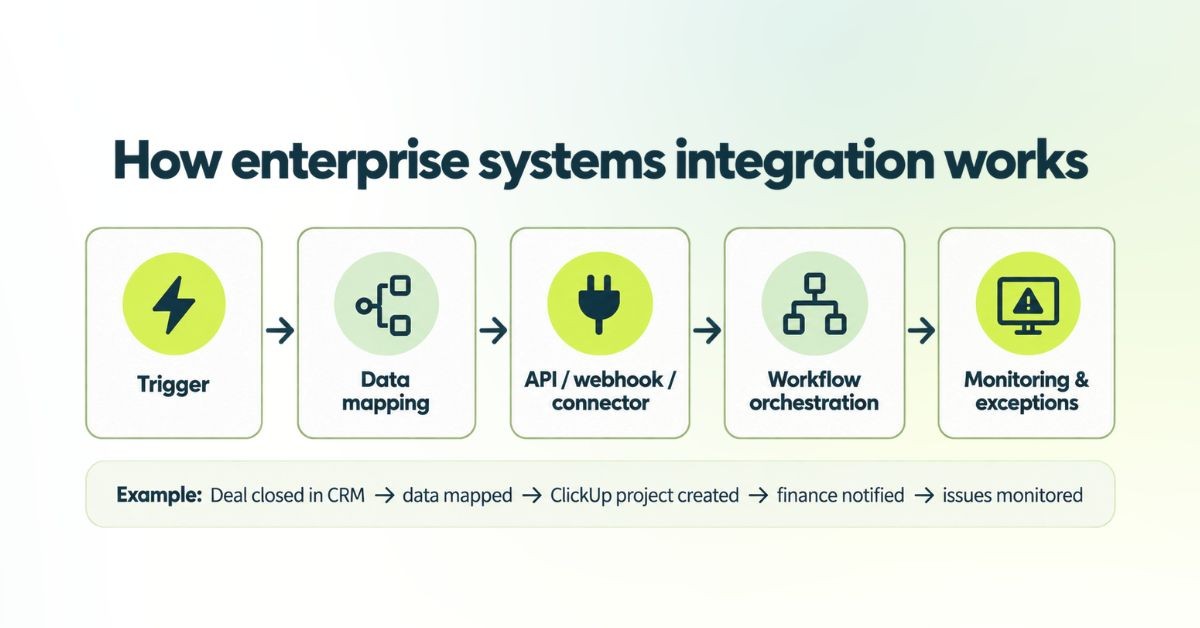
Triggers
A trigger is the event that begins the workflow. A CRM deal changes to "closed won." A customer signs a contract. A project reaches an invoicing milestone. A support ticket becomes urgent. A payment becomes overdue.
Data mapping
Each system may name and structure information differently. "Company" in the CRM, "Client" in ClickUp, "Customer" in the finance system. The integration needs rules for how those records correspond.
APIs, webhooks and connectors
In plain language:
A native integration is a prebuilt connection between two platforms. An API is a structured way for one system to request or update information in another. A webhook is a system proactively sending information when a specific event happens. A connector is a reusable connection provided by an integration platform. Middleware or iPaaS is a central platform that manages connections between several systems.
Workflow or chestration
Orchestration controls the order of events and the business rules. A deal closes. Required information is validated. A project is created. Tasks are assigned. Finance receives a billing request. Leadership reporting is updated. The account owner is notified. Each step depends on the previous one completing successfully.
Monitoring and exception handling
A mature integration should answer: What happens when a required field is missing? What happens when the receiving system is unavailable? Who is notified? Is the request retried? Where is the failure recorded?
This is what separates a reliable production integration from a demo that works in ideal conditions. Most articles about systems integration explain how tools connect. Very few explain what happens when the connection fails.
Choose the right integration pattern
Integration method | Best suited to | Main consideration |
Native integration | Common, straightforward platform connections | Usually quick but may offer limited field mapping or workflow control |
Direct API or webhook | Custom workflows between a small number of systems | Flexible, but requires testing, documentation and maintenance |
Automation platform or iPaaS | Connecting several SaaS applications | Faster to build, but governance and usage costs must be managed |
Scheduled or batch integration | Reporting, finance or large data transfers | Reliable for non-urgent data but not immediate |
Event-driven integration | High-volume or time-sensitive processes | Scalable, but more technically complex |
Hub-and-spoke architecture | Multiple systems sharing a central integration layer | Easier to govern than numerous direct connections |
Direct point-to-point integrations work well for a small number of connections. But complexity grows rapidly as more systems are added. Fully connecting ten applications directly could require 45 separate pairwise connections. A hub-and-spoke or middleware approach becomes more practical as the number of systems increases.
No single method is universally best. The right pattern depends on the number of systems, the volume of data, the urgency of updates and the technical resources available.
How to build a connected operating system across your business
This should be the most actionable section. It follows the same process-first approach we use at Sharpflow.
Step 1: Define the business outcome
Do not start by asking "which platforms can we connect?" Start with outcomes: reduce the time between a deal closing and delivery beginning. Eliminate repeated customer data entry. Create accurate project profitability reporting. Reduce approval delays. Give leadership one view of delivery risk. Measure the baseline before building anything.
Step 2: Map the complete process
Map the workflow from beginning to end. Trigger, people involved, systems used, information created, decisions and approvals, handoffs, exceptions and final outcome.
At Sharpflow, this is always the first stage of every engagement. We map the real workflow before building automations. A process that has never been properly documented cannot be reliably integrated.
Step 3: Audit the existing technology stack
For each tool, document: business purpose, owner, users, data stored, existing integrations, duplicate functionality, contract cost, security requirements and whether the team actually uses it.
Step 4: Assign a system of record
Decide where the authoritative version of each data type lives. Customer and deal data in the CRM. Delivery data in ClickUp. Invoice and payment data in the finance platform. Employee information in the HR system. Avoid making several systems equally responsible for the same information.
Step 5: Define exactly what should move
For every integration, document: triggering event, source system, destination system, fields transferred, sync direction, frequency, validation rules, permissions, failure behaviour and integration owner.
Step 6: Decide what should remain human
Not every decision should be automated. Human approval may still be appropriate for large discounts, contract changes, high-value payments, unusual project scope, sensitive customer communication and legal or compliance decisions.
Step 7: Build and test a high-value pilot
Start with one process that is repetitive, clearly defined, measurable, high enough value to matter and low enough risk to test safely.
Step 8: Document, train and continuously improve
Document integration logic, field mappings, owners, credentials and access, error responses, change history and dependencies. Shared standards, reusable architecture and clearly defined responsibilities prevent each team from building integrations independently and creating maintenance problems for the rest of the organisation.
Example: Connecting CRM, project delivery, finance and communication
Consider a professional services business that wins a new customer.
The opportunity changes to closed won in HubSpot or Salesforce. The integration checks that the service, value, start date and customer details are complete. A ClickUp project is created from the appropriate delivery template. Relevant customer and scope information is mapped into custom fields. A project owner is assigned based on service, region or workload. Tasks, dependencies and deadlines are generated. The finance platform receives the billing information or creates a draft invoice. The delivery team receives a Slack notification. Leadership dashboards update with the new revenue and delivery commitment.
When the project reaches a billing milestone, finance is notified automatically. If any system fails, an exception task is created for an owner instead of allowing the problem to disappear silently.
The business impact: no repeated data entry, faster handoff from sales to delivery, clear project ownership, more consistent onboarding, better revenue and capacity visibility, fewer status-chasing messages.
This is the type of operational example most vendor articles fail to explain clearly.
Should you integrate, consolidate, replace or retire a tool?
Integration is not always the correct answer.
Decision | When it makes sense |
Integrate | The platform performs a valuable specialist function but needs to exchange information with other systems |
Consolidate | Several tools perform overlapping functions and moving into one platform would reduce complexity |
Replace | The current platform has poor adoption, limited integration capability or no longer supports the process |
Retire | The tool has no clear owner, little usage or no unique value |
Leave separate | The information does not need to move and connecting it would add unnecessary cost or risk |
Connecting everything is not a strategy. Every connection creates something that must be secured, monitored and maintained.
Common enterprise systems integration mistakes
Automating a broken process. Integration makes a process move faster. It does not automatically make the process sensible. If the underlying workflow is unclear, the integration reproduces confusion at speed.
Synchronising every field. Only move information that another system genuinely needs. Over-syncing creates noise, performance issues and maintenance burden.
Failing to define the system of record. Two-way updates without clear ownership can create conflicts, duplicates and overwrite problems.
Building too many point-to-point connections. One-off connections may be fast initially but become difficult to maintain as the technology stack expands.
Ignoring exceptions. A successful demonstration is not the same as a reliable production workflow. Plan for what happens when a required field is missing, a system is down, or a record doesn't match.
Treating real-time sync as mandatory. Some data requires immediate updates. Other information can move hourly, daily or only when a milestone occurs. Match the update frequency to the business need, not the technical capability.
Ignoring security and permissions. Every connection creates another path through which business information can move. Authentication, authorisation, encryption, access control and monitoring should be considered during design, not added afterwards.
Failing to assign an owner. Someone must be responsible for reviewing errors, managing changes and checking whether the integration still serves the business.
Where ClickUp fits in an integrated enterprise system
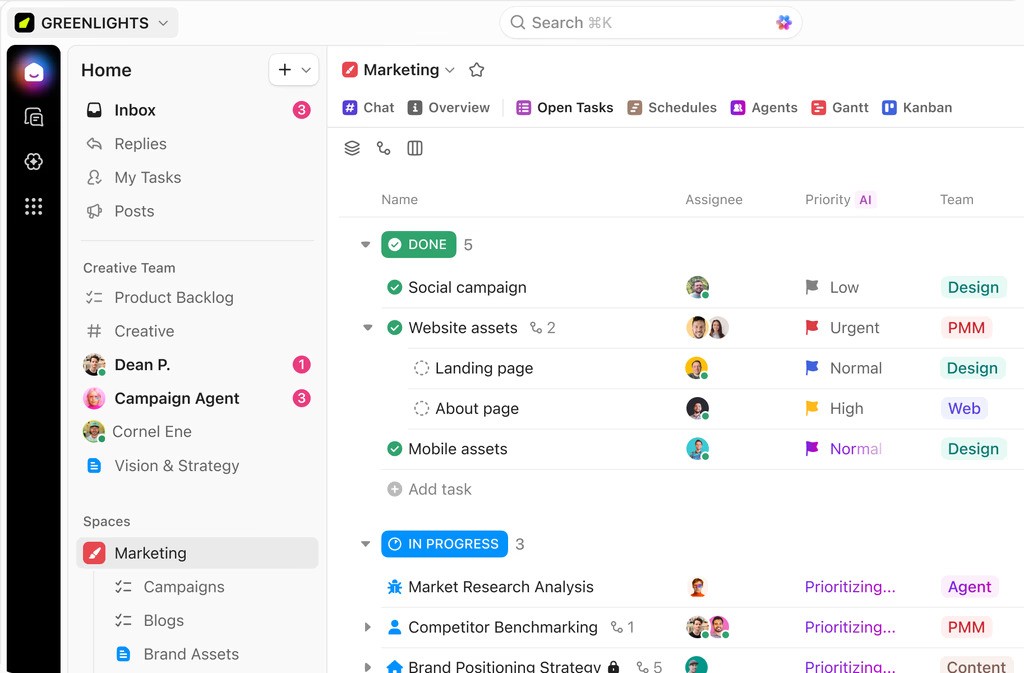
ClickUp is not a replacement for every CRM, finance platform or enterprise database. Its role in an integrated stack is typically as:
A work orchestration layer. A project and delivery system. An operational visibility layer. A task and ownership system. A workflow automation platform. A management dashboard. A coordination point between departments.
ClickUp supports native and third-party integrations, a public API, API webhooks and automation webhooks. It can connect to systems including Salesforce, HubSpot, Google Workspace, Slack, QuickBooks and many others, although specific capabilities and plan availability vary.
The key point is that ClickUp becomes valuable when it is given a clearly defined operational role inside the wider technology stack. Simply connecting applications without redesigning the workflow can reproduce the same confusion in a more automated form.
When we built the operational system for PXM Explore, the business was coordinating bookings through HubSpot, spreadsheets, WhatsApp Business, email, phone calls and verbal communication. We mapped the complete guest journey and created a connected operational platform using ClickUp, automation and AI. The result: eight systems consolidated into one, a 52% reduction in manual booking administration and 70% faster supplier coordination.
How to measure the ROI of enterprise systems integration
Avoid vague claims about "improved efficiency." Define what efficiency means and measure it.
Useful metrics include: number of manual entries per transaction, time from closed deal to project launch, time spent chasing approvals, process cycle time, data correction rate, duplicate record rate, handoff delays, integration failure rate, exception resolution time, employee adoption, reporting preparation time, customer onboarding time, administrative hours per project, number of redundant applications retired and software expenditure reduced.
Capture a baseline before implementation and compare it after launch.
When we built the operational system for BTW Creative, we mapped the agency's real production process, created custom pipelines and automated client onboarding. Within the first 90 days, BTW Creative reported 48% less internal administration, onboarding reduced from two hours to 30 minutes and 63% fewer project-related emails. Those numbers exist because the baseline was captured before the build started.
When do you need an enterprise integration consultant?
A business may need consulting support when:
Several departments use overlapping platforms. The same information is maintained in multiple systems. Native integrations cannot support the required workflow. Automations regularly break without anyone noticing. No one knows which platform owns which information. Reporting requires repeated spreadsheet reconciliation. A CRM, ERP or work management migration is planned. The organisation wants to introduce AI into operational workflows. Multiple integrations have been built without documentation. Internal teams understand their individual platforms but not the end-to-end operating process.
A proper consulting engagement should deliver more than a connector setup. It should include a current-state systems audit, process maps, a systems and data inventory, a source-of-truth matrix, integration architecture, field and data mapping, automation requirements, security and permission requirements, exception handling plans, a phased implementation roadmap, testing, team training, integration documentation and ongoing optimisation.
This is the work we do at Sharpflow. We map how your business operates, identify where systems, data and handoffs are disconnected, and design the connected operational system using ClickUp, automation, APIs, CRM workflowsHow enterprise systems integration works and scalable processes.
Connect the process, not just the tools
Enterprise systems integration is not primarily a connector project. The end-to-end process must be understood first. Every data type needs clear ownership. Specialist platforms can remain in place. Automations require monitoring and maintenance. The best integration removes coordination work without hiding important decisions.
Your technology stack should support the way your business operates, not force your team to work around disconnected systems. Book a discovery call to explore where your current systems are creating unnecessary work.