ClickUp vs Notion
ClickUp vs Notion: Which One Should You Choose in 2026?
Date
Author
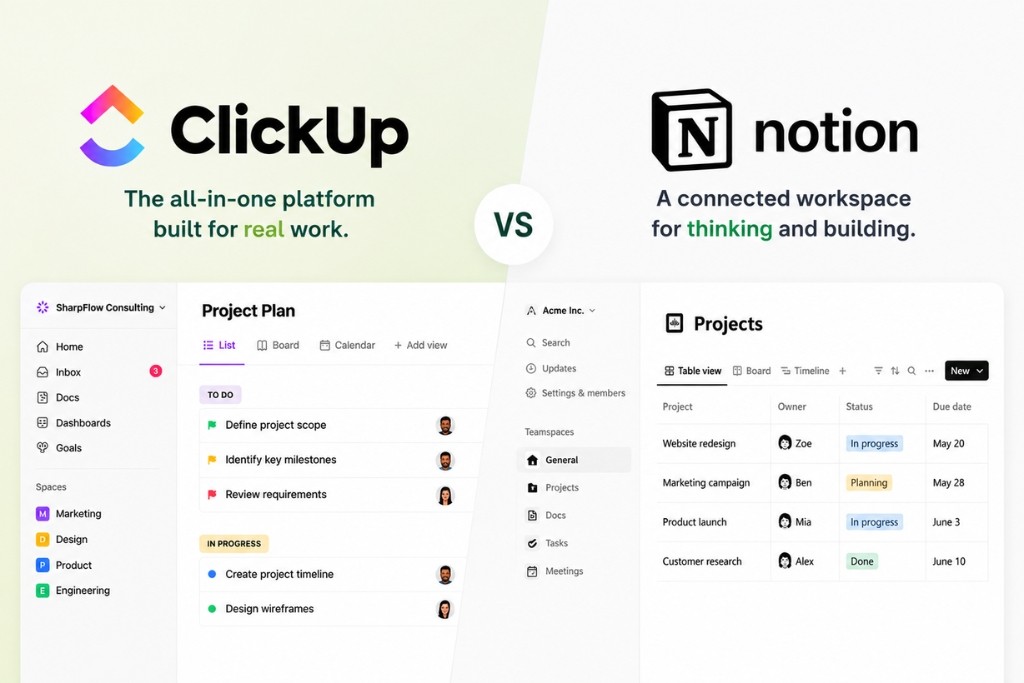
After implementing ClickUp for 100+ teams, many migrating from Notion, our verdict: ClickUp wins for agencies, operations teams, and any business running repeatable processes that need time tracking, automation, and reporting. Notion wins for knowledge heavy teams, solo users, and companies where documentation is the primary need.
The deciding factor isn’t features, it's whether your team needs to manage work or document it.
Let’s start by saying,we're not neutral reviewers. We're an Official ClickUp Partner, and we'll be upfront about that. But we've also seen where ClickUp falls short, and we'll cover that honestly too.
This guide shares what we've learned from 100+ real world implementations: why teams switch between the two platforms, the pros and cons of each, and how to decide which fits your business.
Why teams leave Notion for ClickUp (and vice versa): real data from our client intakes
Before comparing features, it's worth understanding why teams actually switch. Not what the marketing pages say. But what we actually hear in our discovery calls when teams come to us looking to move from Notion to ClickUp.
Here are the top five reasons clients have come to us after outgrowing Notion:
Reason | % of Clients |
Needed dashboards and reporting for leadership | ~35% |
Outgrew Notion’s project management capabilities | ~25% |
Needed native time tracking for billing | ~20% |
Workspace became chaotic without structure | ~12% |
Wanted to consolidate multiple tools into one | ~8% |
The pattern is consistent. Teams start with Notion because it's flexible and fast to set up. As the team grows past 8 to 10 people, or as the work becomes more process driven, the gaps start to show. No time tracking. No workload views. No dashboards. No automations beyond the basics. The flexibility that made Notion attractive becomes a liability when there's no structure enforcing consistency.
We know this because we've built the ClickUp workspaces these teams switched into. One of those, BTW Creative, a creative marketing agency, saw a 48% reduction in internal admin time and cut client onboarding from two hours to 30 minutes after moving their operations into a properly structured ClickUp workspace.
A Caveat
Many businesses don't choose one platform exclusively, and they don't have to.
For most organisations, ClickUp becomes the operational hub for managing projects, tasks, reporting, and automations. At the same time, some teams continue using Notion for documentation, internal wikis, or knowledge management, particularly if they already have an established library of content.
Over time, many businesses naturally consolidate more of their work into ClickUp as they standardise their processes. Others continue using both platforms because each serves a different purpose within the business.
As we often tell our clients, the best workspace isn't the one with the most features. It's the one that's designed around how your team actually works.
"Working with Sharpflow streamlined the way we operate and transformed our business." Adam Karmi, Co-Founder, Barbell Marketing
Category | Winner | What We See in Real Deployments |
Task Management | ClickUp | "The hierarchy alone saves agency clients hours per week in task organisation" |
Docs and Wiki | Notion | "Notion's block editor is genuinely best in class. ClickUp Docs are improving but not there yet" |
Automations | ClickUp | "Teams setting up 10 to 15 automations in month one save roughly 4 hours per week on manual updates" |
Dashboards and Reporting | ClickUp | "The number one feature request we hear from Notion users switching over" |
Time Tracking | ClickUp | "Native time tracking is the single biggest reason agencies leave Notion" |
Ease of Use | Notion | "Notion teams self onboard in days. ClickUp teams need a structured rollout" |
Free Plan | ClickUp | "Unlimited users on free. Startups run with this for months before upgrading" |
Pricing (Paid) | ClickUp | "30 to 40 percent cheaper at equivalent tiers. The gap widens above 10 seats" |
AI Features | Tie | "ClickUp Brain knows your project context. Notion AI is stronger for writing" |
Knowledge Management | Notion | "If your primary job is organising information, not managing tasks, Notion wins" |
Templates | Tie | "Notion has far more community templates. ClickUp's ops templates save more setup time" |
Integrations | ClickUp | "1,000+ native integrations vs Notion's smaller but growing library" |
ClickUp vs Notion 101
What is ClickUp?
ClickUp is an all in one work management platform designed to help teams manage projects, tasks, documents, goals, and communication from a single workspace. It combines project management, collaboration, reporting, and automation into one highly customisable platform.
Where we typically deploy it: agencies managing multiple client workflows, operations teams tracking deliverables across departments, and businesses looking to consolidate tools like Slack, Jira, Salesforce, HubSpot, and Google Docs into one central system.
What is Notion?
Notion is a flexible workspace that combines notes, documents, databases, and lightweight project tracking into a single, block based editor. It focuses on knowledge management, documentation, and creative collaboration.
Where we see it work best: startups documenting their processes, content teams managing editorial workflows, and knowledge heavy organisations building internal wikis and team handbooks.
Which is better for task management: ClickUp or Notion?
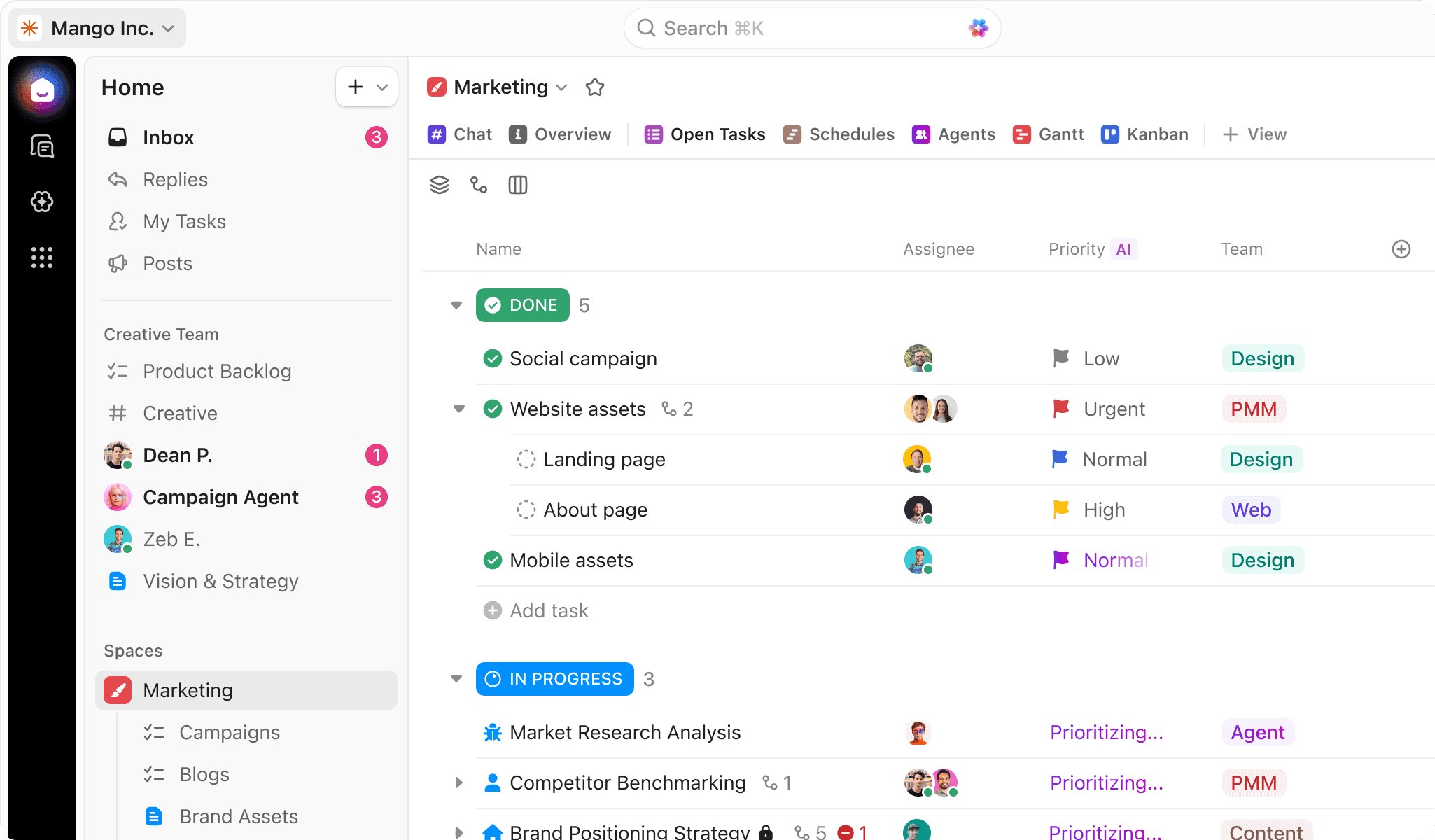
For teams managing complex operations, multiple departments, or repeatable client workflows, ClickUp is significantly better than Notion for task management.
ClickUp uses a five level hierarchy: Space, Folder, List, Task, Subtask. This gives teams multiple ways to organise work by department, client, project, or process while maintaining clear reporting lines across the entire business. Tasks can have multiple assignees, custom statuses, dependencies, priorities, time estimates, recurring schedules, custom fields, and fully functional subtasks. Different Lists can have completely different workflows, allowing marketing, operations, and customer success teams to work in ways that suit their specific processes.
ClickUp also includes native time tracking built into every task across all plans, including free. Team members can start timers, log time manually, and see estimated versus actual hours at the task, project, and workspace level. This data feeds directly into dashboards, workload views, and profitability reports.
Notion handles tasks through databases. You can create a database, add properties like status, assignee, and due date, and view the data as a table, Kanban board, calendar, or timeline. For small teams with simple projects, this works well. But Notion has no dependencies, no Gantt charts, no workload views, no native time tracking, and no sprint management.
In the field
When we onboarded BTW Creative, a creative marketing agency, their production workflows had outgrown scattered emails and spreadsheets. We built custom production pipelines, contractor management systems, and automated client onboarding inside ClickUp. The result: 48% reduction in internal admin time and 63% fewer project-related emails. That kind of operational improvement isn't possible in Notion because the underlying task management infrastructure doesn't exist.
Where this breaks
ClickUp's task management depth can become a weakness if every team builds tasks differently. We've seen workspaces where every List has its own statuses, priorities, and custom fields, creating confusion rather than consistency.
We're hell-bent on simplicity at Sharpflow. The best implementations balance flexibility with governance, giving teams enough control without turning the workspace into a collection of completely different systems.
Verdict: If your team needs straightforward task tracking and values simplicity, Notion works for small teams. If you run repeatable processes, need time tracking, or require granular control over how work is managed and reported, ClickUp is the stronger platform and scales far better as complexity increases.
Which has better docs and wiki: ClickUp or Notion?
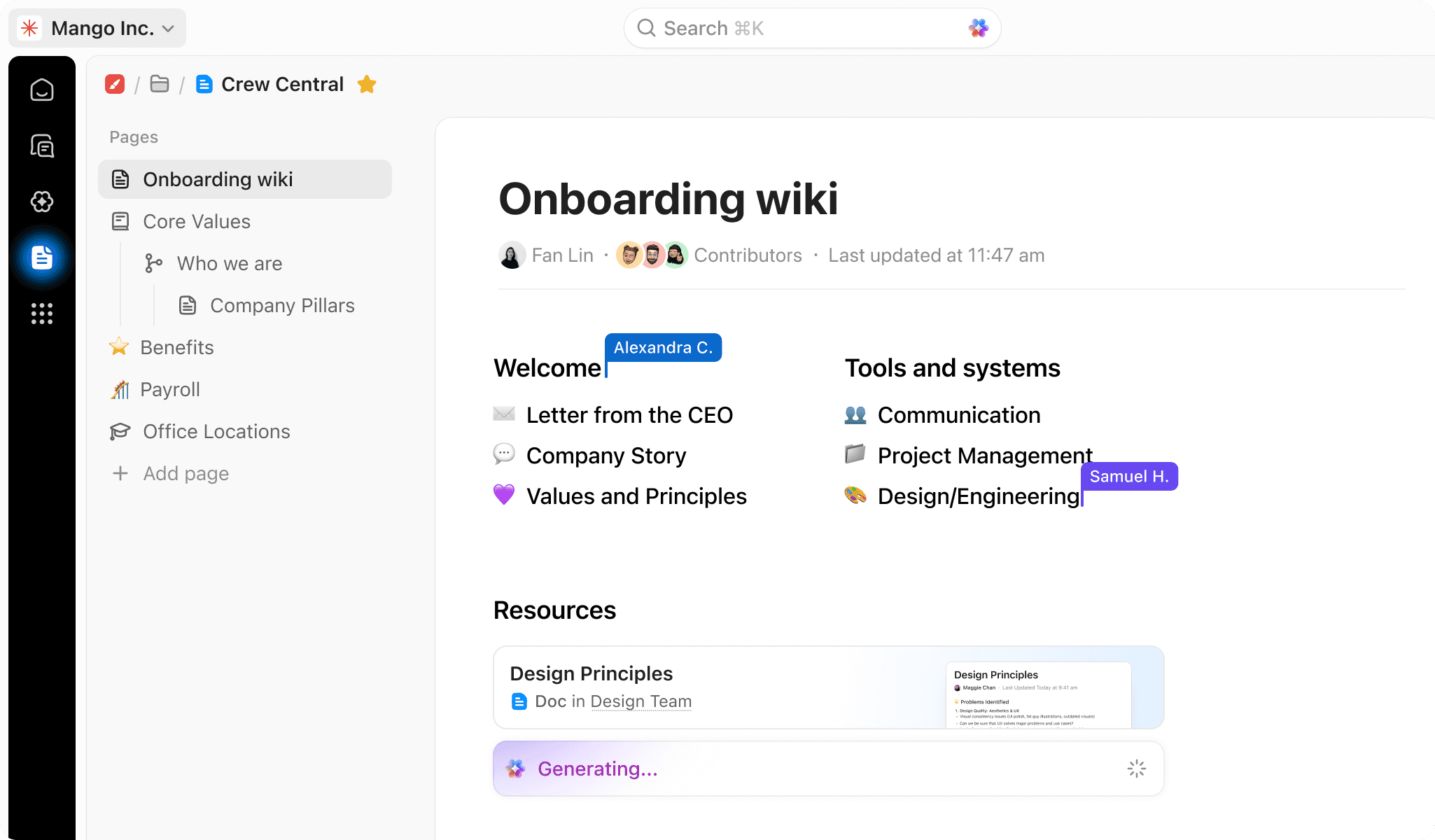
For documentation and knowledge management, Notion is the better tool. Its block editor, synced blocks, and infinite nesting are best in class.
Credit where it's due. Notion's documentation experience is excellent. Everything is a block: text, headings, images, code snippets, embeds, databases, toggles, callouts. You can rearrange, nest, and combine blocks freely. Synced blocks let you write content once and display it across multiple pages. Update it in one place, it updates everywhere.
The Notion template gallery has thousands of community created templates. For building team wikis, SOPs, client onboarding docs, or internal knowledge bases, it's unmatched.
ClickUp has Docs, and they've improved dramatically. You can create rich text pages, nest them hierarchically, embed live ClickUp views inside documents, and collaborate in real time. ClickUp's biggest Docs advantage is context: a document lives inside your workspace alongside the tasks, projects, and data it relates to. You can embed a live task list view inside a project brief.
But the editing experience is still a step behind Notion. The block system isn't as fluid. The formatting options aren't as extensive.
In the field
We still see some of our ClickUp clients keep a small Notion instance for their company wiki, and we tell them that's fine. For most teams though, ClickUp Docs handle 80 percent of documentation needs. The trade off of running two systems versus having slightly less polished documentation inside one system usually tips towards consolidation, especially for teams already managing operations, CRM workflows, and automations inside ClickUp.
Where this breaks
Notion's synced blocks and infinite nesting are genuinely superior for complex documentation systems. If your organisation's primary output is knowledge (research firms, editorial teams, training companies), ClickUp Docs will feel limiting. The gap is narrowing, but it's real.
Verdict: If documentation and knowledge management are your primary need, Notion is the better tool. If you need both docs and operations in one system, ClickUp can handle both, but Notion's docs experience is superior.
Which has better automations: ClickUp or Notion?
ClickUp wins decisively on automations.
ClickUp's automation engine uses a trigger, condition, action model. Over 100 pre-built automation templates cover common workflows. You can chain multiple actions in a single automation. When a status changes, ClickUp can automatically reassign the task, update a custom field, send a notification, move the task to a different list, and create a follow up task.
Notion added native automations in 2023, and they've continued to improve. You can trigger actions when database properties change, like sending a Slack notification when a status updates. But the depth isn't comparable. Fewer trigger types, fewer action types, limited conditional logic, no multi step automation chains, no webhook triggers for external system integration.
Notion users who need serious automation rely on Zapier or Make. That works, but it adds $20 to $50 per month in tool cost and moves the automations outside the workspace, making them harder to audit, debug, and maintain.
In the field
One of our recent clients, Patrick Ansara at Ethos Benefits, needed their Salesforce and ClickUp systems integrated. We built that natively, connecting CRM data to operational workflows without relying on external automation platforms. As Patrick put it: "Sharpflow did a great job integrating our Salesforce and ClickUp systems." That kind of cross platform automation, built natively and documented so the team understands what's running, is something Notion simply can't support without significant external tooling.
Where this breaks
ClickUp's automations are powerful, but they require governance. We've seen workspaces with hundreds of poorly documented automations firing simultaneously, creating duplicate tasks, conflicting statuses, and confusion across teams. More automations don't automatically mean a better system. The most successful implementations focus on a small number of high value automations that support genuinely repeatable processes.
Verdict: If your team only needs basic triggers, Notion's automations cover the essentials. For agencies, operations teams, and businesses running sophisticated processes, ClickUp's automation engine is in a different category entirely.
Which has better dashboards and reporting: ClickUp or Notion?
ClickUp wins this category with zero competition. Notion has no native dashboards or reporting at all.
This is the feature gap that turns Notion users away the most often.
ClickUp dashboards are fully customisable with 50+ widget types. Time tracking reports showing hours logged versus estimated, broken down by person, project, or client. Workload widgets visualising capacity across the team. Status breakdowns showing how many tasks sit in each stage. Sprint velocity tracking. Goal progress monitoring. Custom calculation widgets pulling from any custom field.
Notion has database views, filtered and sorted in various ways. You can create rollup properties that aggregate data across related databases. Simple charts on database views were added in 2024. But there are no real dashboards. No drag and drop widget builder. No time tracking data to report on. No workload visualisations.
In the field
This is the number one feature request we hear from Notion users switching to ClickUp. When a founder asks "show me what everyone's working on this week," Notion has no answer that doesn't involve someone manually assembling a report.
ClickUp's dashboard widgets pull live data from across the workspace. For leadership teams who want visibility without chasing updates (one of the core problems we solve for every client), this alone justifies the switch.
Where this breaks
ClickUp dashboards can become cluttered if every team member creates their own without coordination. We recommend building three core dashboards per workspace: one for leadership (high level health), one for project managers (operational detail), and one for individual contributors (personal workload). That structure keeps reporting useful without creating dashboard sprawl.
Verdict: If you need operational reporting, capacity planning, or any form of business intelligence from your work management platform, ClickUp is the only option. Notion does not compete in this category.
Which has better AI features: ClickUp Brain or Notion AI?
This category is too close to call definitively. ClickUp Brain and Notion AI have different strengths that reflect each tool's core identity.
Notion AI is bundled into Business plans ($20 per user per month) and includes Ask Notion for plain language queries across your workspace, AI Autofill for automatically populating database properties, and Notion Agents for autonomous multi step tasks. For knowledge heavy organisations, Notion AI reasons over your documentation with field level precision.
ClickUp Brain relaunched in June 2026 as Brain2 and includes workspace wide knowledge retrieval, automated standups and status reports, AI writing, and Super Agents that you can mention and assign tasks to like a team member. It sits across tasks, documents, chat, and knowledge management.
The key difference is context. ClickUp Brain knows your project data: sprint velocity, due dates, task ownership, time entries. Notion AI knows your documents: content, structure, relationships between pages.
In the field
We recently built a Super Agent in 30 minutes that scans retainer tasks weekly and nudges anything with no movement for 7+ days. Immediate ROI, zero code. For teams running their operations inside ClickUp, this kind of autonomous task execution is powerful. Notion's agents are strong for document workflows, but for operational task management, ClickUp Brain has a meaningful edge right now.
Where this breaks
Most businesses still aren't getting significant value from project management AI tools. We've seen teams get excited about AI features during demos only to use them occasionally for meeting summaries. Workspace structure, processes, and team adoption still have a far greater impact on productivity than AI features alone.
Verdict: For knowledge management and writing, Notion AI wins. For operational task execution and project context queries, ClickUp Brain wins. We wouldn't recommend choosing either platform based solely on AI capabilities right now.
Which is easier to use: ClickUp or Notion?
Notion is easier to use and adopt than ClickUp. Teams typically become productive faster because the platform is simpler, more visual, and requires far less upfront configuration.
This is one area where we think it's important to be completely honest. Notion's interface is intuitive. Most teams can create pages, assign work, and start managing projects with very little training. It's one of the reasons Notion consistently scores highly for ease of use on G2 and Capterra.
ClickUp's learning curve is real. The platform offers significantly more views, hierarchy levels, customisation options, and workflow capabilities than Notion. That flexibility is one of its greatest strengths, but it also means new users can feel overwhelmed initially. Without clear processes and proper onboarding, teams can struggle to understand where information lives.
That doesn't mean ClickUp is difficult forever. In our experience, adoption is heavily influenced by implementation quality. When teams have a well structured workspace, clear processes, and appropriate training, the learning curve becomes manageable. That's the core of what we do at Sharpflow: we map out processes, goals, and team workflows before we start building, then give teams practical, jargon free training so there's adoption and confidence from day one.
In the field
Our data shows properly rolled out ClickUp teams achieve full adoption in 3 to 4 weeks. Without a rollout plan, we've seen teams abandon ClickUp within 6 months. The tool isn't the problem. The implementation is. As Charles Howes at Klatch told us: "Sharpflow transformed our scattered task lists into a streamlined ClickUp." That transformation only happens when someone takes the time to design the workspace around how the team actually works.
Where this breaks
Notion's simplicity is also its ceiling. We've seen teams adopt it incredibly quickly, only to outgrow it a year later when they needed deeper hierarchy, more sophisticated reporting, or more advanced automations. What feels refreshingly simple at five people can become frustrating at twenty.
Verdict: If your priority is getting a team productive as quickly as possible with minimal training, Notion is the clear winner. If you're willing to invest a few weeks in proper onboarding in exchange for greater flexibility and scalability, ClickUp's steeper learning curve delivers a higher long term payoff.
ClickUp vs Notion pricing: with clear scenarios
At first glance, the pricing looks fairly similar. The real differences only become obvious when you model actual teams and the features they need.
Scenario 1: 5 person startup
ClickUp Unlimited: $7 per user per month x 5 = $420 per year Notion Plus: $10 per user per month x 5 = $600 per year Savings: $180 per year with ClickUp
Note: ClickUp's free plan includes unlimited users and tasks. Startups can run on free for months before upgrading.
Scenario 2: 12 person agency
ClickUp Business: $12 x 12 = $1,728 per year Notion Business: $20 x 12 = $2,880 per year
But Notion users also need a time tracking tool like Toggl or Harvest. At roughly $10 per user per month, that's $1,440 per year extra.
True total cost: ClickUp $1,728 vs Notion $4,320. Savings of $2,592 per year with ClickUp.
Scenario 3: 30 person operations team
ClickUp Business: $12 x 30 = $4,320 per year Notion Business: $20 x 30 = $7,200 per year Savings: $2,880 per year with ClickUp
Rule of thumb: Below 5 seats the cost difference is trivial, maybe $15 per month. Above 10 seats ClickUp saves $100+ per month, and the gap grows with every hire.
Pricing verified July 2026.
How to actually decide: the 5 question framework we use with clients
Instead of comparing feature lists, we use this framework during every discovery call. It takes five minutes and consistently points to the right answer.
Question | If Yes | If No |
Is your primary need managing work, not documenting it? | ClickUp | Notion |
Does your team need time tracking or billing visibility? | ClickUp (non negotiable) | Either works |
Are 5+ people using the system daily? | ClickUp | Notion is fine |
Do you run multi stage workflows with dependencies? | ClickUp | Notion |
Is your team willing to invest 3 to 4 weeks in proper setup? | ClickUp (higher long term payoff) | Notion (faster start) |
If you answered yes to three or more, ClickUp is almost certainly the better fit. If you answered no to most, Notion will serve you well and your team will adopt it faster.
Switching from Notion to ClickUp: what to expect
A Notion to ClickUp migration is less about moving data and more about redesigning systems. Most teams can complete the transition in four to six weeks. The technical migration is usually the easy part. The real work is redesigning processes and getting people comfortable with a completely different way of organising work.
Realistic timeline
Weeks 1 to 2: Process mapping and workspace architecture. Document your existing pages, databases, workflows, and pain points. Design the ClickUp hierarchy (Spaces, Folders, Lists, statuses, custom fields) before importing anything. This is where most of the long term success or failure is determined.
Weeks 3 to 4: Data migration and workspace build. Export Notion content as Markdown or CSV and import into ClickUp. Configure automations, dashboards, views, and integrations. Rebuild any Zapier connections natively.
Weeks 5 to 6: Training and adoption. Role based training sessions for leadership, managers, and team members. Go live support, then set a hard cutoff date for Notion operational use.
What transfers cleanly
Page content exports as Markdown and imports into ClickUp Docs. Basic task lists export as CSV and import into ClickUp Lists. Assignees, dates, and simple properties map across without much trouble.
What doesn't transfer
Notion relations, rollups, formulas, synced blocks, and database views do not transfer. These need to be rebuilt using ClickUp's custom fields, relationships, and views. Any automations built through Zapier or Make need reconfiguring as native ClickUp automations.
The 3 mistakes teams make migrating solo
1. Trying to replicate Notion's structure in ClickUp. The two platforms organise work completely differently. ClickUp's hierarchy (Space, Folder, List) operates on different logic than Notion's infinite page nesting. The best migrations redesign the system around how ClickUp actually works.
2. Migrating without mapping processes first. Migrations are the perfect opportunity to simplify processes and eliminate years of operational clutter. Otherwise, you're simply moving the same problems into a new platform.
3. Not training the team. Even perfectly built workspaces fail if nobody knows how to use them. ClickUp's flexibility means adoption cannot be left to chance. We've seen businesses spend weeks building excellent workspaces only to see usage collapse within two months because teams weren't properly trained.
If you're planning a switch, book a discovery call with our team. We'll map your workflows first and tell you honestly whether migrating is the right move. And if you need ongoing support after migration, our retainer services keep your workspace evolving as your business grows.
ClickUp vs Notion: best for your team
Agencies
For most agencies, we recommend ClickUp. Client based hierarchy, template date remapping, native time tracking for billing, and dashboard reporting make it exceptionally well suited to repeatable service delivery. When we built BTW Creative's workspace, project setup time dropped from two hours to 30 minutes per client. Notion works for very small content only agencies, but breaks for full service agencies managing deliverables across multiple clients.
Small businesses and startups
The answer depends entirely on complexity. If your team is non technical and simply needs somewhere to assign tasks and track simple projects, Notion is easier to adopt. However, if you're running repeatable processes with deadlines, approvals, and automations, ClickUp provides better long term value. Budget tip: ClickUp's free plan with unlimited users is unbeatable for bootstrapped startups.
Operations and professional services
This is where ClickUp clearly pulls ahead. Operations teams require workload management, cross department visibility, complex automations, time tracking, and sophisticated reporting. Notion doesn't compete at this level. This is exactly the segment we serve most often at Sharpflow, and it's where we see the biggest operational transformations.
Solopreneurs and freelancers
Notion. Personal productivity, content planning, client wiki: Notion's flexibility shines when there's no team to coordinate. ClickUp is overkill for solo operators unless you're building processes for a team you plan to hire. As we note on our website, if you're a solo operator or under 5 team members, we're probably not the right fit either.
ClickUp vs Notion FAQs
Which is better, ClickUp or Notion?
ClickUp for teams managing projects with deadlines, time tracking, and automations. Notion for knowledge management, documentation, and flexible personal workspaces. After 100+ implementations, we find the deciding factor is whether you primarily need to manage work or document it.
Is ClickUp cheaper than Notion?
Yes. ClickUp Unlimited is $7 per user per month vs Notion Plus at $10. At the Business tier, ClickUp is $12 vs Notion at $20. For a 12 person team, ClickUp saves roughly $1,000 to $2,500 per year, especially when you include the cost of third party time tracking tools Notion users need.
Is Notion easier to use than ClickUp?
Yes. Notion has a simpler interface and teams self onboard faster. But ClickUp's steeper learning curve comes with significantly more power. Our data shows properly rolled out ClickUp teams achieve full adoption in 3 to 4 weeks.
Why do teams switch from Notion to ClickUp?
The top reasons from our client intakes: outgrowing Notion's project management capabilities (35%), needing native time tracking (25%), requiring dashboards and reporting (20%), workspace chaos from lack of structure (12%), and wanting to consolidate tools (8%).
Is ClickUp's learning curve really that bad?
It's real but manageable. The number one complaint on Reddit and review sites is overwhelm. Our honest answer as a ClickUp partner: yes, there's more to learn, but with a structured rollout plan and training, teams are productive within 3 to 4 weeks. Without a plan, teams frequently abandon it within 6 months.
Does Notion have time tracking?
No. Notion has zero native time tracking. You'd need a third party tool like Toggl or Harvest at $10 to $15 per user per month, plus an integration to sync data. ClickUp has native time tracking built into every task across all plans including free.
Can Notion handle project management for a growing team?
For small teams under 5 to 8 people running simple projects, yes. For teams managing multiple projects with dependencies, workload balancing, and reporting needs, Notion's database based approach requires significant manual setup and ongoing maintenance. Most teams in this situation end up switching.
Which has better AI: ClickUp Brain or Notion AI?
Different strengths. ClickUp Brain excels at project context queries because it runs inside the PM system. Notion AI is stronger for writing assistance and document summarisation. Notion AI is bundled into Business plans. ClickUp Brain costs $7 to $9 per user per month extra.
Can I use both ClickUp and Notion together?
Yes, and many teams do. ClickUp for operations, Notion for the wiki. It works but means maintaining two systems. For most teams, we recommend consolidating into ClickUp, but running both is valid if documentation is your primary workload.
Can I migrate from Notion to ClickUp without losing data?
Partially. Page content exports as Markdown and imports into ClickUp Docs. But Notion relations, rollups, formulas, synced blocks, and database views don't transfer. Automations need rebuilding. A realistic migration takes 4 to 6 weeks for workspace setup plus team training.
Final verdict
After more than 100 implementations, our verdict remains consistent:
ClickUp is the better platform for agencies, operations teams, and businesses running complex, repeatable processes. Notion is the better choice for knowledge heavy teams, solo users, and companies where documentation is the primary need.
The deciding factor isn't features. It's complexity. The more departments, clients, automations, and workflows you need to manage, the more ClickUp's hierarchy, templates, reporting, and flexibility become valuable. If your needs are relatively simple and your team wants to get up and running with minimal training, Notion is the better bet.
What we'd change about ClickUp
As a ClickUp partner, we'd be the first to admit the platform isn't perfect.
The learning curve still needs better guided onboarding for new users. The platform can feel overwhelming when you're presented with dozens of features, views, and configuration options from day one. Performance can lag in very large, poorly structured workspaces, particularly when years of processes and customisation have accumulated without governance. The mobile app, while improving, still doesn't match the desktop experience for power users. And ClickUp simply contains more functionality than some businesses need. If all you want is a straightforward task list and basic project tracking, the sheer number of options can feel like unnecessary complexity.
None of these are deal breakers. They're implementation challenges that can usually be solved with proper workspace design and clear processes. But they're worth acknowledging because no software platform is perfect, and pretending otherwise doesn't help anyone make a better decision.
Ready to make ClickUp work for your team? Book a discovery call and we'll map your workflows before we build anything. That's how we've always worked, and after 100+ implementations, it's still the part that matters most.


