PM & Ops software 2026
The best project management & ops software in 2026

Date
Author
Choosing enterprise work management software is one of the biggest operational decisions a growing organization will make.
The platform becomes the connective tissue between departments, projects, people, and reporting.
Get it right and leadership has visibility, teams have clarity, and work moves predictably.
Get it wrong and you spend two years managing the tool instead of managing the work.
This guide compares eight enterprise work management platforms based on operational fit, not just feature lists.
We evaluate each against a consistent framework covering scalability, workflow flexibility, automation, reporting, integration, governance, and implementation complexity.
A note on perspective: Sharpflow Consulting is an Official ClickUp Partner. We've implemented ClickUp for more than 100 teams. That means our ClickUp knowledge runs deeper than our knowledge of other platforms. We've included ClickUp in this comparison and evaluated it using the same framework as every other platform. Where our implementation experience adds useful context, we've included it. Where it creates bias, we've tried not to be that guy.
Best enterprise work management software at a glance
Platform | Best for | Enterprise strength | Automation | Reporting | Resource mgmt | Implementation complexity | Key limitation |
ClickUp | Configurable all-in-one work management | Hierarchy depth, consolidation | Strong native engine | 50+ dashboard widgets | Workload views, time tracking | Moderate to high | Requires deliberate architecture |
Wrike | Cross-departmental enterprise teams | Security, compliance, resource mgmt | Strong, request-based | Advanced analytics | Native resource planning | Moderate | UI can feel dated |
Asana | Structured goal alignment | Goals, portfolios, ease of adoption | Moderate, rule-based | Portfolios, dashboards | Workload view on Business+ | Low to moderate | Limited customization at depth |
Visual workflow management | Intuitive UI, fast adoption | Strong, recipe-based | Customizable dashboards | Basic workload view | Low to moderate | Expensive at enterprise scale | |
Smartsheet | Spreadsheet-centric enterprises | Familiar interface, Control Center | Moderate | Reports, dashboards | Resource management add-on | Moderate | Complexity grows quickly |
Adobe Workfront | Creative and marketing operations | Adobe ecosystem integration | Strong, Fusion-based | Advanced, portfolio-level | Detailed resource planning | High | Requires Adobe commitment |
Jira (Atlassian) | Software and agile teams | Agile maturity, developer tooling | Moderate, automation rules | Advanced roadmaps, dashboards | Team-managed capacity | Moderate to high | Non-technical teams struggle |
Planview | Enterprise portfolio and strategy | PPM, strategic alignment | Moderate | Executive-level analytics | Advanced resource optimization | High | Heavy implementation, premium pricing |
Hold up, what is enterprise work management software?
Enterprise work management software is a platform that enables organizations to plan, execute, track, and report on all work across departments and teams from a single system.
Unlike basic project management tools designed for individual teams, enterprise work management connects cross-functional workflows, standardizes processes, provides portfolio-level visibility, and supports the governance, security, and scalability requirements of larger organizations.
The distinction matters. Project management handles work inside a single project. Enterprise work management handles work across the organization: how projects relate to each other, how resources are allocated between departments, how handoffs happen, and how leadership sees the whole picture.
How we evaluated these platforms
Every platform was assessed against ten enterprise-readiness dimensions:
Enterprise scalability. Can it support hundreds of users across multiple departments without architectural workarounds?
Workflow flexibility. Can different departments run different processes within a consistent organizational structure?
Portfolio and program management. Can leadership see progress, health, and resource allocation across multiple projects and programs?
Automation. How sophisticated is the native automation engine, and what are the limits?
Reporting and executive visibility. Can dashboards and reports be built for different organizational levels without manual assembly?
Resource and workload management. Can the platform show who is available, who is overloaded, and where capacity exists?
Integration and API. Can it connect to CRM, ERP, finance, messaging, and other enterprise systems?
Governance, permissions, and security. Does it support role-based access, SSO, audit logs, and compliance requirements?
Ease of adoption. How quickly can non-technical teams become productive?
Implementation complexity. How much process mapping, architecture design, migration, and change management is required?
Most comparison articles stop at dimension eight.
But, based on our experience of onboarding teams into these systems, dimensions nine and ten, adoption and implementation complexity, are what determine whether the system will take off with your team… or flop.
Best enterprise work management software for 2026
ClickUp
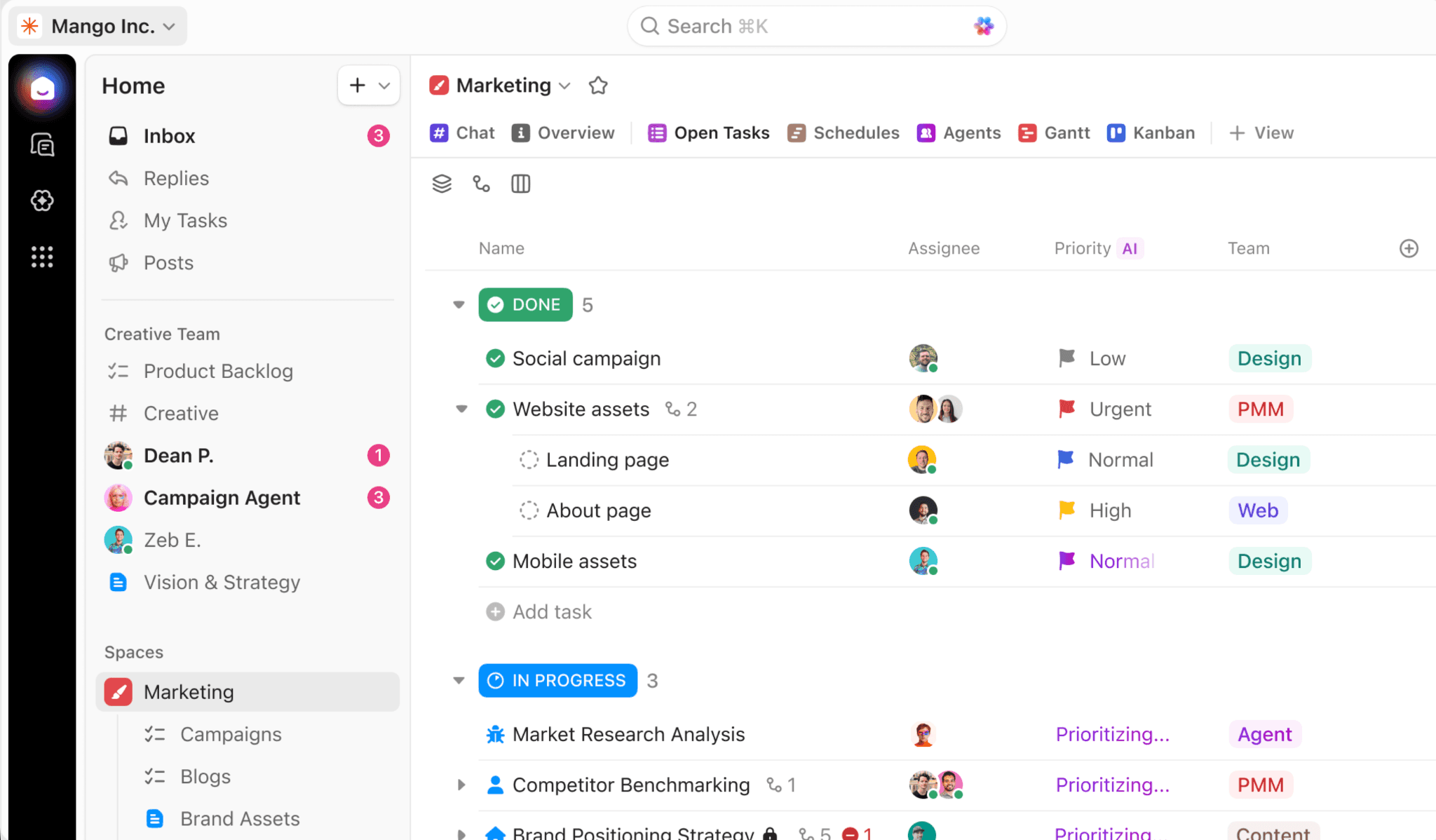
Best for: Organizations that want a highly configurable, all-in-one work management platform at a competitive price point.
ClickUp's five-level hierarchy (Workspace, Space, Folder, List, Task) gives it more organizational depth than most competitors. Different departments can run entirely different workflows within a consistent architecture, which is the fundamental requirement of enterprise work management.
Native time tracking, 50+ dashboard widget types, docs, goals, forms, whiteboards, and chat are all built in, reducing tool sprawl, and spend, too.
The automation engine supports complex multi-step workflows with triggers, conditions, and actions. ClickUp Brain (their AI layer, relaunched as Brain 2 in mid-2026) can search across workspace data, generate status updates, and run background agents that monitor tasks autonomously.
Throw in the more than 1,000 native integrations, plus a robust API cover, and you’ve accounted for pretty much any enterprise connection you might need.
Where ClickUp falls short: The depth that makes ClickUp powerful also makes it complex to implement well. Without deliberate workspace architecture, naming conventions, status standardization, and automation governance, large ClickUp deployments can become difficult to navigate.
G2 data shows ClickUp's customer base is approximately 77% SMBs and 18% mid-market, which means its enterprise track record is still developing compared to platforms like Wrike, Workfront, or Planview.
Implementation considerations: ClickUp benefits significantly from professional implementation. Process mapping before workspace design, role-based training, and governance planning are the differences between a workspace teams use daily and one they abandon within six months.
At Sharpflow, this is exactly the work we do: designing and implementing ClickUp workspaces around how organizations actually operate.
Pricing: Starts at $7/user/month (Unlimited). Business plan at $12/user/month. Enterprise plan available with custom pricing, SSO, advanced permissions, and dedicated support.
Who should choose it: Organizations that want maximum configurability, tool consolidation, and competitive pricing, and are willing to invest in proper implementation.
Who should look elsewhere: Organizations that need a proven enterprise-only platform with an established Fortune 500 track record, or teams that want minimal configuration effort.
Wrike
Best for: Cross-departmental enterprise teams that need strong security, compliance, and resource management.
Wrike has the longest enterprise track record on this list, with a dedicated enterprise platform since 2013 and clients including Estee Lauder, Walmart, and Siemens.
It offers SOC 2 Type II, ISO 27001, ISO 27018, GDPR, CCPA, and HIPAA compliance, the strongest security posture in this comparison. Resource management, request forms, cross-tagging, and Gantt-based project planning are mature and well-tested.
Where Wrike falls short: The user interface feels more intimidating, and less user-friendly, than competitors like Monday.com or Asana. The hierarchy is functional but not as deep as ClickUp's. Pricing is higher at the Business tier ($25/user/month), and the most powerful features require Enterprise or Pinnacle plans.
Implementation considerations: Moderate complexity. Wrike's structure is less open-ended than ClickUp's, which can make initial configuration more straightforward. However, enterprise deployments with cross-departmental workflows, custom request forms, and advanced permissions still require careful planning.
Pricing: Business at $25/user/month. Enterprise and Pinnacle tiers available with custom pricing.
Asana
Best for: Organizations that prioritize ease of adoption and structured goal alignment.
Asana's strongest enterprise features are Goals (OKR-style objective tracking) and Portfolios (cross-project oversight).
The interface is clean and adoption is typically faster than most competitors, because everything is so intuitive. AI Studio allows teams to build custom AI agents for workflow automation.
Over 169,000 organizations use Asana, including Amazon, Accenture, and Anthropic. So it’s clear it’s a real contender.
Where Asana falls short: Customization depth is limited compared to ClickUp or Smartsheet. Native time tracking was added relatively recently and isn't as mature. Resource management is available on Business plans but less sophisticated than Wrike or Workfront. The pricing jumps can be steep: Advanced at $24.99/user/month, Enterprise on custom pricing.
Implementation considerations: Lower complexity than most enterprise platforms. Asana's more opinionated structure means less architectural decision-making upfront, but also less flexibility for organizations with highly varied departmental workflows.
Monday.com
Best for: Organizations that want fast adoption, visual workflows, and intuitive project management.
Monday.com's greatest strength is how quickly teams become productive.
The board-based interface is immediately understandable, and the visual design makes status tracking and workflow management accessible to all, even the least technical of users. Monday also offers a CRM product and a service management product within the same ecosystem.
Where Monday.com falls short: The flat board structure becomes limiting for complex cross-departmental work. Enterprise pricing is steep, with real-world enterprise contracts averaging over $130,000 per year according to SpendHound data. Automation limits on lower plans (250/month on Standard) force early upgrades. The 3-seat minimum and seat-increment billing add unexpected cost.
Implementation considerations: Low to moderate complexity. Monday.com's visual, board-based approach requires less architectural planning than ClickUp or Wrike, but organizations managing work across many departments may find the flat structure restrictive as they scale.
Smartsheet
Best for: Organizations where spreadsheets are the dominant working paradigm.
Smartsheet appeals to enterprises where leadership, finance, and operations teams think in rows and columns. Control Center enables portfolio-level project management. DataMesh connects data across sheets. The interface feels familiar to Excel and Google Sheets users, which reduces adoption friction for specific audiences.
Where Smartsheet falls short: The spreadsheet paradigm that makes Smartsheet familiar also makes it complex at scale. Organizations with hundreds of interconnected sheets often report performance issues and navigational challenges. The UI is functional but not modern compared to ClickUp, Monday.com, or Asana. Resource management is available as an add-on rather than a core feature.
Implementation considerations: Moderate complexity. The initial learning curve is low for spreadsheet-oriented users, but enterprise deployments with Control Center, dynamic views, and cross-sheet automations require careful architecture planning.
Pricing: Pro at $9/user/month. Business at $19/user/month. Enterprise on custom pricing. Enterprise contracts average over $130,000 per year.
Adobe Workfront
Best for: Creative and marketing operations teams, especially those already in the Adobe ecosystem.
Workfront integrates natively with Adobe Creative Cloud, Experience Manager, and other Adobe products. This makes it the strongest option for marketing operations teams managing campaigns, creative production, and digital asset workflows. Portfolio management, resource planning, and approval workflows are mature and well-suited to regulated or process-heavy creative environments.
Where Workfront falls short: Outside the Adobe ecosystem, Workfront's value proposition weakens considerably. Pricing is premium (custom quotes only, no public plans). The interface has a steeper learning curve than Monday.com or Asana. Implementation timelines for enterprise deployments can be lengthy.
Implementation considerations: High complexity. Workfront deployments typically require dedicated project management, integration with existing Adobe tools, and significant change management. This is not a self-service platform.
Jira (Atlassian)
Best for: Software development and engineering-centric organizations.
Jira remains the standard for agile software development, with mature sprint management, backlog grooming, roadmaps, and developer tooling. Jira Work Management extends some of these capabilities to business teams, though adoption among non-technical users remains a challenge. The Atlassian ecosystem (Confluence, Bitbucket, Statuspage) provides depth for engineering-led organizations.
Where Jira falls short: Non-technical teams consistently report difficulty adopting Jira. The interface is optimized for developers, not operations teams, marketing departments, or client-facing functions. Cross-functional work management across business and engineering teams often requires workarounds. Licensing complexity across the Atlassian suite can be difficult to manage.
Implementation considerations: Moderate to high complexity. Jira's configurability is deep but heavily oriented toward software development paradigms. Organizations that want a single platform for both engineering and business operations may find it difficult to keep all teams happy.
Pricing: Standard at $8.15/user/month. Premium at $16/user/month. Enterprise on custom pricing.
Planview
Best for: Large enterprises focused on strategic portfolio management and investment optimization.
Planview (including Planview Portfolios, formerly Enterprise One, and Planview AgilePlace) serves the upper end of the enterprise market. Strategic portfolio management, scenario planning, financial modeling, and resource optimization are its core strengths. It's designed for PMOs and transformation offices managing enterprise-level investment decisions.
Where Planview falls short: Planview is not a day-to-day task management tool. The interface and workflows are designed for portfolio-level oversight, not individual contributor task tracking. Implementation is heavy, timelines are long, and pricing reflects the premium enterprise positioning.
Implementation considerations: High complexity. Planview deployments are typically multi-month initiatives requiring dedicated project teams, data migration, and integration with existing ERP and finance systems.
What should enterprise teams look for in work management software?
Most comparison articles focus on features. Features matter, but they're the easier half of the decision. The harder questions are operational:
Can different departments work differently without breaking reporting consistency? This is the core tension of enterprise work management. Marketing, operations, delivery, and finance all work differently. The platform needs to support that variation while still rolling up into consistent, organization-wide reporting. Platforms with deeper hierarchy (ClickUp, Wrike) handle this better than flatter structures (Monday.com, Asana).
Can leadership see the whole picture without asking for it? Dashboard and reporting capabilities determine whether leadership has real-time visibility or relies on someone assembling a weekly update. ClickUp's 50+ dashboard widgets, Wrike's analytics, and Workfront's portfolio reports lead this category.
What is the total cost, not just the license? Software licensing is the visible cost. The larger cost is implementation: process mapping, workspace architecture, data migration, automation building, integration setup, training, and adoption management. A $7/user/month platform that requires four months of professional implementation may cost more in the first year than a $19/user/month platform that teams self-configure in two weeks. Factor both.
How will you handle governance? Without naming conventions, permission models, status standardization, and automation documentation, any enterprise workspace degrades over time. Ask how each platform supports governance before asking how it handles task assignment.
Enterprise work management vs project management software
The terms get used interchangeably, but they need to be seen as completely different things.
Project management software handles the work inside individual projects: tasks, timelines, milestones, dependencies, and team collaboration. Examples include Trello, Basecamp, and simpler configurations of any platform on this list.
Enterprise work management software handles work across the organization: connecting projects into programs and portfolios, managing resources across departments, standardizing workflows while allowing departmental variation, providing executive-level reporting, and supporting the governance and security requirements of larger organizations.
Most platforms on this list can do both. The question is how naturally they scale from project-level to enterprise-level and how much architectural work is required to make that transition.
Why the right software can still fail after implementation
This section won't appear in any vendor-authored comparison, because vendors have no incentive to explain why their own platform might fail. But it's the most important section for anyone making this decision.
Copying broken processes into new software.
The most common failure. Organizations migrate their existing workflows, including the workarounds, inconsistencies, and manual steps, directly into the new platform. The new tool inherits every problem the old one had. The fix: map processes before configuring software. Simplify or eliminate what doesn't work before building it into the new system.
Over-customization.
Enterprise work management platforms, especially highly configurable ones like ClickUp and Smartsheet, allow nearly unlimited customization. Without governance, teams create inconsistent statuses, redundant custom fields, conflicting automations, and unnavigable workspace structures. More flexibility does not automatically mean a better system.
Skipping adoption planning.
A technically excellent workspace that nobody uses is worth nothing. Different roles need different training. Leadership needs dashboard visibility. Managers need workflow control. Individual contributors need to know where their tasks are and how to update them. Training everyone in the same generic session serves no one well.
No system owner after launch.
Workspaces degrade without maintenance. Automations break silently. Naming conventions drift. New Spaces get created ad hoc. Every enterprise deployment needs a designated system owner responsible for ongoing governance and optimization.
At Sharpflow, these are the problems we solve before they happen. We map processes first, design the architecture, build the workspace, and train the team, with ongoing retainer support to keep the system evolving as the organization grows.
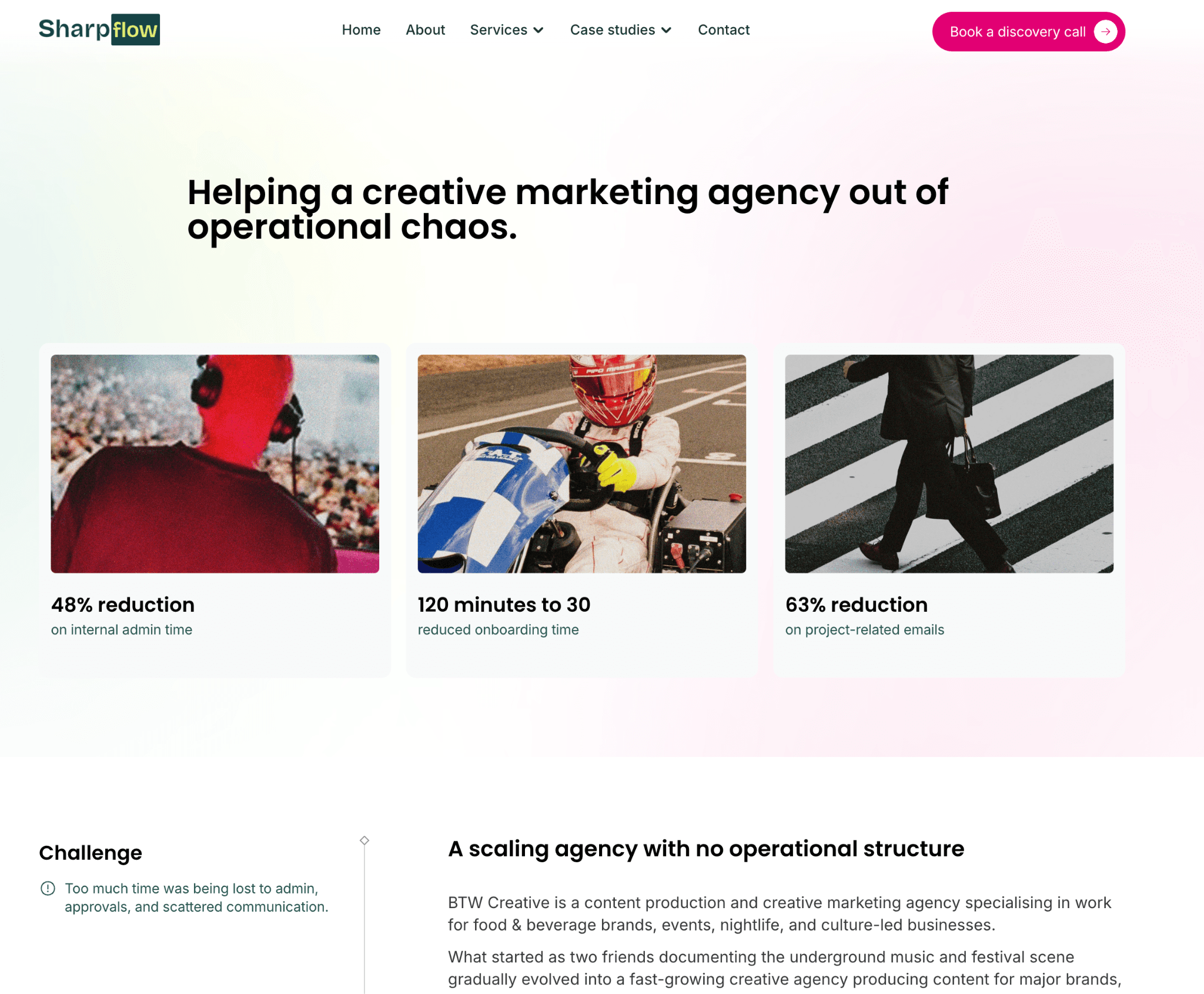
We've seen firsthand what happens when teams skip these steps, and the results when they don't: BTW Creative saw a 48% reduction in internal admin time and a 63% drop in project-related emails after a properly implemented ClickUp deployment.
When ClickUp makes sense for enterprise work management
ClickUp is a strong fit when an organization wants:
Maximum configurability without premium enterprise pricing
Tool consolidation: docs, chat, time tracking, goals, and project management in one platform
Deep hierarchy that supports varied departmental workflows within a consistent architecture
Strong native automation with AI capabilities (Brain 2, Super Agents)
A platform that can grow from startup to enterprise without migration
ClickUp is a less obvious fit when:
The organization needs a platform with an established Fortune 500 enterprise track record
The team has minimal tolerance for configuration complexity
Nobody is willing to invest in proper architecture, training, and governance
The primary need is strategic portfolio management at the executive level (Planview or Workfront may be stronger)
When another platform may be a better fit
ClickUp is the platform we know best, and it's the one we implement. But we’re not going to tell you to use the platform if we know you’re going to struggle…
Choose Wrike if enterprise security and compliance are non-negotiable requirements and the organization needs proven cross-departmental resource management.
Choose Asana if fast adoption and structured goal alignment matter more than deep customization, and the organization prefers a more opinionated platform.
Choose Monday.com if the team values visual simplicity and fast time-to-value, and cross-departmental hierarchy depth is less critical.
Choose Smartsheet if the organization's dominant working paradigm is spreadsheets and the transition to a completely different interface would create significant resistance.
Choose Adobe Workfront if creative and marketing operations are the primary use case and the organization is already invested in the Adobe ecosystem.
Choose Jira if software development is the core function and the organization needs mature agile tooling integrated with developer infrastructure.
Choose Planview if the primary requirement is strategic portfolio management, investment optimization, and executive-level planning.
Do you need an enterprise work management consultant?
Not always. Organizations with straightforward workflows, small teams, and technical leadership can often configure platforms like Monday.com or Asana internally.
External expertise becomes valuable when:
Work spans multiple departments with different processes
The organization is migrating from an existing platform with years of accumulated data and workflows
Automation, integration, and reporting requirements are complex
Leadership needs dashboards built to specific operational questions
Previous attempts at platform adoption have failed
Nobody internally has the time or expertise to design workspace architecture
The value isn't in clicking buttons. It's in knowing which buttons to click and which to leave alone.
Frequently asked questions
What is enterprise work management software?
A platform for planning, executing, tracking, and reporting on work across an entire organization. It connects cross-functional workflows, standardizes processes, provides portfolio-level visibility, and supports the governance and security requirements of larger organizations.
What is the best enterprise work management software?
It depends on the organization. ClickUp offers the deepest configurability at the lowest entry price. Wrike leads on enterprise security and compliance. Asana wins on ease of adoption. Monday.com excels at visual simplicity. Smartsheet suits spreadsheet-oriented teams. Adobe Workfront is strongest for creative operations. Jira leads for engineering teams. Planview serves strategic portfolio management.
How much does enterprise work management software cost?
Published pricing ranges from $7/user/month (ClickUp Unlimited) to $25/user/month (Wrike Business). Enterprise tiers are typically custom-quoted. Real-world enterprise contracts range from approximately $49,000/year (ClickUp) to over $165,000/year (Atlassian), depending on user count, features, and negotiation. Implementation costs should be factored separately.
Can ClickUp be used for enterprise work management?
Yes. ClickUp's five-level hierarchy, native time tracking, 50+ dashboard widgets, automation engine, AI capabilities, 1,000+ integrations, and enterprise security features make it a viable enterprise platform. Implementation quality is the determining factor in whether it scales successfully.
What is the difference between work management and project management software?
Project management handles work inside individual projects. Work management handles work across the organization: connecting projects into portfolios, managing resources across departments, standardizing workflows, and providing executive-level visibility.
How do you implement enterprise work management software?
Start with process mapping: document how work actually moves through the organization. Design the workspace architecture before configuring anything. Build automations, dashboards, and integrations. Train different roles separately. Assign a system owner for ongoing governance.
What is the biggest risk when implementing enterprise work management software? Copying broken processes into the new platform. If workflows are unclear, inconsistent, or undocumented, the new software will inherit every existing problem. Map and improve processes before configuring technology.
How long does enterprise work management implementation take?
Basic implementations can take 4 to 8 weeks. Complex enterprise deployments with multiple departments, migrations, integrations, and change management typically take 3 to 6 months. The timeline depends on organization size, process complexity, and the amount of workflow redesign required.
Final verdict
Enterprise work management software selection is a high-stakes decision, but the software itself is only part of the equation. How the platform is implemented, how processes are mapped into it, how governance is maintained, and how teams are trained to use it determine whether the investment delivers value or becomes another tool people work around.
For organizations that want maximum configurability, tool consolidation, and strong value at scale, ClickUp is worth serious consideration. For organizations with different priorities, security requirements, or ecosystem commitments, Wrike, Asana, Monday.com, Smartsheet, Workfront, Jira, and Planview each serve distinct enterprise needs well.
The platform you choose matters. What you do with it matters more.
If ClickUp is the right fit for your organization and you need help turning it into a properly designed, scalable operational system, Sharpflow Consulting can help.
We map your processes, design the architecture, build the workspace, automate the repeatable work, and train your team. Book a discovery call and we'll start by understanding how your business actually operates.