ClickUp vs Monday
ClickUp vs Monday.com: Verdict After 100+ Implementations

Date
Author
After implementing ClickUp for more than 100 teams, including many businesses migrating directly from Monday.com, for us, ClickUp wins every time.
In our experience, ClickUp consistently outperforms Monday.com for agencies, operations teams, and businesses managing repeatable, multi-layered workflows. Its hierarchy, templates, reporting, and automation capabilities make it incredibly powerful as teams grow.
However, Monday.com has it strengths too. Monday wins for teams under 10 people who value speed-to-adoption over depth. When it comes down to the two, the deciding factor isn't usually features. It's how much process complexity your team works with.
In this guide, we're sharing our verdict after more than 100 real-world implementations, covering why teams switch between the two platforms, where each tool shines, where there are potential drawbacks, and why we think ClickUp is the best fit for most teams.
Why teams leave Monday.com for ClickUp: Real data from our client intakes
Reason | % of Clients |
Pricing becomes unsustainable at scale | ~20% |
Reporting and visibility limitations | ~20% |
Template and repeatable workflow limitations | ~15% |
Automation caps too restrictive | ~10% |
Needed deeper hierarchy / workspace structure | ~35% |
A caveat
We all love honesty here, so we will say we have seen teams move in the opposite direction too.
ClickUp's flexibility and sheer scope can become overwhelming, particularly for businesses that don't have complex processes to manage, or clear power users who can take the lead. The number of views, configuration options, and hierarchy layers creates a steeper learning curve than Monday.com, which can be a little much for teams to handle.
For smaller teams that simply want a visual way to track projects and assign tasks, that extra capability can feel like unnecessary complexity. In those cases, Monday.com's simpler interface and faster time-to-value often make it the better choice.
At the end of the day, sometimes it isn't about choosing the platform with the most features, it's choosing the one your team will actually enjoy using every day.
Key takeaways for faster decision making
Category | Winner | What we see in the real world |
Templates | ClickUp | Monday.com's templates are great for quickly duplicating simple boards, whereas ClickUp's templates can deploy entire operational systems. |
Ease of use | Monday | Monday teams can self-onboard in days and create a decent setup without external support. |
Hierarchy & structure | ClickUp | Space > Folder > List gives ops teams a lot more depth and organisational opportunity that Monday can't match. |
Automations | ClickUp | ClickUp Unlimited includes far more automations per month than Monday Standard’s 250 cap. That headroom matters when teams start scaling repeatable processes. |
Time tracking | ClickUp | Native time tracking across all plans, so you can actively track in the task. Monday charges extra or requires third-party tools. |
Reporting & dashboards | ClickUp | 50+ dashboard widgets vs Monday's more limited reporting, the contrast is night and day here. |
Visual project management | Monday | Monday's board view is really incredible for visual thinkers. It's intuitive and requires minimal training, which is great for adoption. |
Pricing at scale | ClickUp | ClickUp Business from $12 p/m, p/u. Monday Pro from $19 p/m, p/u - ClickUp scales much better for larger teams. |
Free plan | ClickUp | ClickUp offers unlimited users and unlimited tasks, which is incredibly generous. Monday.com strictly caps its free plan at a maximum of 2 users and limits you to 3 boards. |
Integrations | ClickUp | 850 native integrations for Monday.com, 1000 for ClickUp. ClickUp just cinches it. |
AI features | Tie | Both are moving incredibly fast with AI, if we came down on either side this article would be out of date within a few days. |
Onboarding speed | Monday | Teams on Monday.com can be productive from day one. |
ClickUp vs Monday 101
What is ClickUp?
ClickUp is an all-in-one work management platform designed to help teams manage projects, tasks, documents, goals, and communication from a single workspace. It combines project management, collaboration, reporting, and automation tools into one highly customisable platform, making it suitable for businesses that need more than simple task tracking.
Where we typically deploy it: agencies managing multiple client workflows, operations teams tracking deliverables across departments, and businesses looking to consolidate tools like Slack, Jira, and Google Docs into one central system.
What is Monday.com
Monday.com is a visual work operating system that helps teams plan projects, manage tasks, and collaborate through highly intuitive boards and workflows. It focuses on ease of use and fast adoption, allowing teams to build processes and start tracking work with minimal setup or training.
Where we typically see it work well: teams under 10 people that need a simple, visual way to manage projects, businesses prioritising quick adoption over deep customisation, and organisations that want straightforward project tracking without significant implementation overhead.
Which is better for hierarchy and visibility: ClickUp or Monday.com?
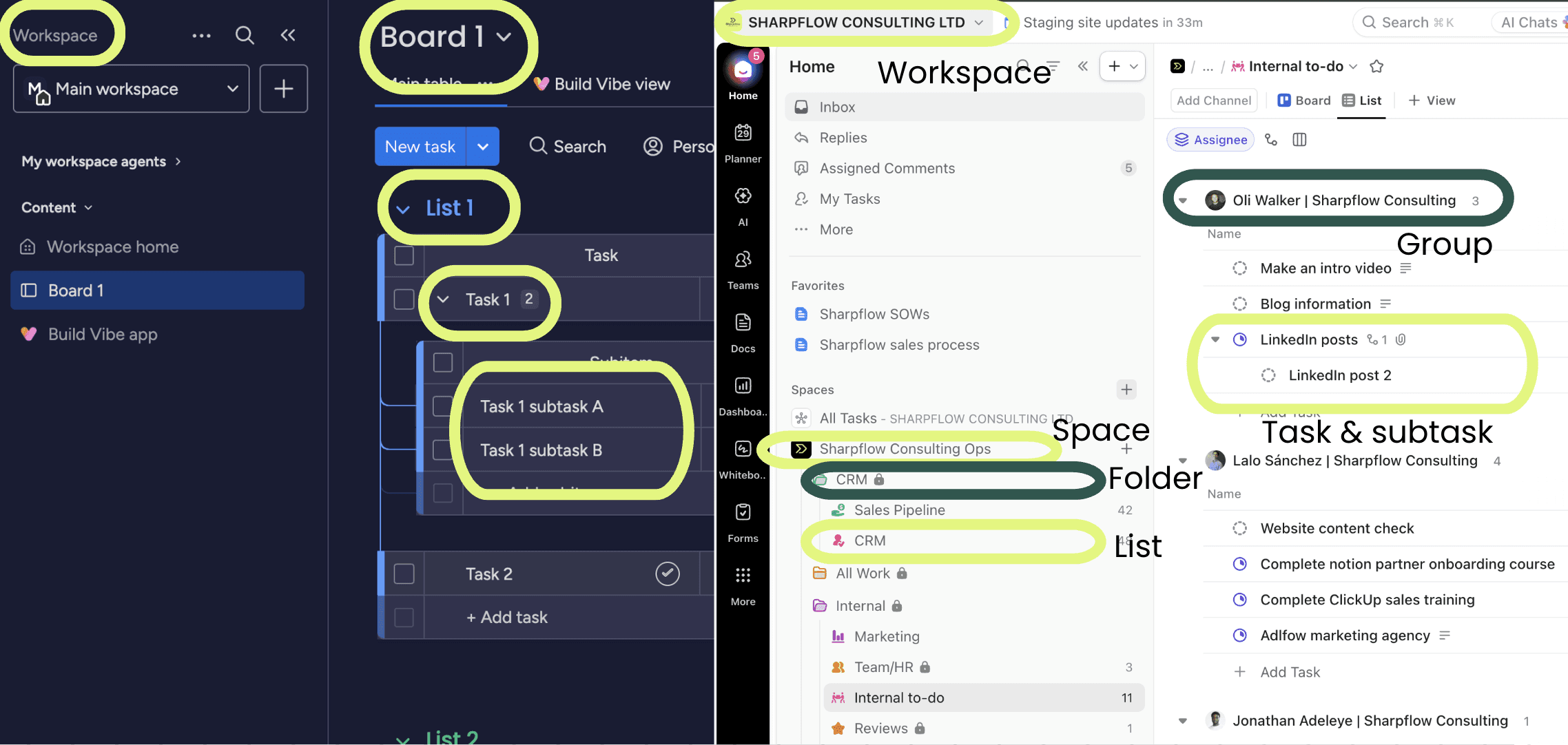
Visual guide to Monday.com structure and organisation vs ClickUp.
For businesses managing complex operations, multiple departments, or numerous client projects, ClickUp is better than Monday.com for hierarchy and visibility.
The biggest difference between the two platforms is how they structure work. ClickUp uses a five-level hierarchy: Space > Folder > List > Task > Subtask. This gives teams multiple ways to organise work by department, client, project, or process while maintaining clear reporting lines and visibility across the entire business.
Monday.com uses a flatter structure: Workspace > Board > Group > Item. This simplicity is one of its strengths because teams can understand the platform almost immediately. However, as organisations become larger or processes become more complex, the lack of hierarchy can make work harder to organise. Information often ends up spread across dozens of disconnected boards, making cross-project reporting and visibility increasingly difficult.
For operations-heavy businesses, the additional depth in ClickUp's hierarchy becomes essential. Leadership teams can roll up reporting from individual tasks all the way to departments and company-wide dashboards without needing to piece information together manually.
In the field
When migrating teams from Monday to ClickUp one of the main concerns we hear is that our clients are struggling to “see everything at the right altitude”. This doesn’t work well with flat tools like Monday.com.
"I'm working within one particular project, and I feel limited. I can't share that… you have to add them to the big project. But maybe you don't want them to see the big project".
Where this can break
ClickUp's hierarchy only works when it's implemented intentionally. We've seen businesses create dozens of Spaces, duplicate workflows, and end up with information scattered across the workspace. Without governance, the flexibility that makes ClickUp so powerful can quickly become overwhelming. The structure needs to be designed from day one and maintained as the business grows.
Verdict: If you're a small team managing relatively simple projects, Monday.com's flatter structure is usually easier to understand and maintain. If you run an agency, operations team, professional services business, or any organisation with multiple departments and repeatable processes, ClickUp's hierarchy and visibility are significantly more capable and will scale far better as complexity increases.
Need help designing a scalable ClickUp workspace? See how our ClickUp onboarding services help businesses build the right structure from day one.
Which is better for templates and repeatable workflows: ClickUp or Monday.com?
For businesses running repeatable projects, recurring client work, or standardised processes, ClickUp is significantly better than Monday.com for templates and repeatable workflows.
Both platforms allow users to create templates, but they approach repeatable work very differently. Monday.com provides board templates that can help teams get started quickly, and for straightforward project tracking, they're often sufficient. However, the template functionality becomes more limited when workflows need to be repeated frequently or involve multiple dependencies and deadlines.
ClickUp's template system goes much deeper. Teams can create templates for entire Spaces, Folders, Lists, tasks, documents, and checklists. More importantly, ClickUp includes date remapping, allowing all deadlines within a project to automatically shift relative to a new start date. For agencies, consultancies, and service businesses running similar projects repeatedly, this eliminates a huge amount of manual administration.
The difference becomes even more apparent at scale. Repeatable workflows can be standardised across departments, automatically populated with tasks, assignees, dependencies, and documentation, allowing teams to launch projects consistently every single time.
In the field
"We have a number of templates… things that we template that we just utilize to do that. I'm looking at ClickUp to become a workflow management system".
Where this can break
ClickUp's template capabilities are incredibly powerful, but they require upfront thinking. We've seen businesses create overly complicated templates containing unnecessary statuses, automations, and dependencies that end up confusing users rather than helping them. The goal isn't to template everything, it's to standardise the processes that happen repeatedly and genuinely benefit from automation.
Verdict: If your team mainly needs simple project boards that can be duplicated occasionally, Monday.com's templates will do the job. But if you manage recurring client work, standardised delivery processes, onboarding workflows, or projects that follow the same sequence every time, ClickUp's template system is in another league. For agencies and operations teams in particular, date remapping alone can save hours of administrative work every week.
Which is better for task management: ClickUp or Monday.com?
For teams that need advanced workflow control and process management, ClickUp is better than Monday.com for task management. For teams prioritising simplicity and visual organisation, Monday.com has the edge.
Both platforms handle the fundamentals well. You can assign work, set due dates, add comments, upload files, and track progress in either system. For many smaller teams, Monday.com's visual boards make task management feel approachable and easy to maintain.
Where ClickUp pulls ahead is depth. Tasks can have multiple assignees, dependencies, custom statuses, priorities, relationships, recurring schedules, time estimates, custom fields, and fully functional subtasks. Different Lists can even have completely different workflows, allowing marketing, operations, and customer success teams to work in ways that suit their specific processes.
Monday.com's task management is intentionally simpler. Boards are highly visual and flexible, but workflow logic is less granular. This is often an advantage for smaller teams because there are fewer decisions to make and less risk of overcomplicating the platform. However, as businesses grow and processes become more sophisticated, many teams start looking for greater control over how work moves through the organisation.
In the field
We recently migrated a company who's merchandising workflows had outgrown Monday's task structure. They had 60+ team members, multi-phase processes across 8 departments, and needed tasks that could carry template-driven subtasks, custom fields, and automations. Monday couldn't accommodate that layered task complexity.
Where this can break
ClickUp's depth can become a weakness if every team builds tasks differently. We've seen workspaces where every List has its own statuses, priorities, and custom fields, creating confusion rather than consistency. The best ClickUp implementations balance flexibility with governance, giving teams enough control without turning the workspace into a collection of completely different systems.
Verdict: If your team needs straightforward project tracking and values simplicity, Monday.com's task management is excellent. If you run repeatable processes, need sophisticated workflows, or require granular control over how work is managed and reported, ClickUp is the stronger platform and scales far better as operational complexity increases.
Which has better time tracking and reporting: ClickUp or Monday.com?
For teams that need detailed reporting on time, capacity, and operational performance, ClickUp is better than Monday.com for time tracking and reporting. For teams simply wanting to record how long tasks take, Monday.com's approach is often sufficient.
Both platforms offer native time tracking. Team members can log hours against tasks, view time entries, and generate basic reports on where time is being spent. For smaller teams with straightforward reporting requirements, either platform can handle the essentials.
Where ClickUp pulls ahead is reporting depth. Time tracked against tasks can feed into dashboards showing team capacity, estimated versus actual hours, workload distribution, and project progress. Time estimates and tracked time also work together, making it easier to understand whether projects are running to plan and where bottlenecks are emerging. This is particularly valuable for agencies, professional services businesses, and operational teams that need visibility beyond simply recording hours.
Monday.com's time tracking is more lightweight. The time tracking column makes it easy to start and stop timers and see how long tasks are taking, but reporting is less comprehensive and often requires additional setup or integrations to provide deeper insights. For many teams, this simplicity is perfectly adequate, but it can become restrictive when leadership needs more advanced operational reporting.
In the field
We were recently working with a client who cited the inability to track elapsed time on projects in Planner as a primary reason for moving. He was literally "building it out in Excel" until ClickUp's native time tracking was configured. He needed to show executives exactly how long projects take, and no other tool gave him that without a third-party add-on.
Where this can break
Neither platform is a replacement for dedicated time-tracking software in every situation. Businesses requiring highly detailed utilisation reporting, invoicing workflows, timesheet approvals, or financial forecasting may eventually outgrow the native capabilities of both platforms and look towards specialist tools such as Harvest or Everhour. Additionally, time data is only as reliable as team adoption. Even the best reporting becomes meaningless if people forget to track their time consistently.
Verdict: If your team simply needs to record time against tasks, Monday.com does the job well and keeps things simple. If you need meaningful operational reporting, capacity planning, and visibility into how time impacts projects and profitability, ClickUp is the stronger platform and offers significantly more room to grow.
Which has better automations and integrations: ClickUp or Monday.com?
For most growing businesses, ClickUp offers better automations and integrations than Monday.com because it includes significantly more automation capacity at lower price points and provides a larger native integration ecosystem.
Both platforms allow teams to automate repetitive work, connect with third-party tools, and reduce manual administration. Monday.com's automation builder is particularly user-friendly and makes it easy for teams to create simple workflows using if-this-then-that logic. For smaller teams with relatively straightforward processes, it works extremely well.
The difference becomes apparent as automation requirements grow. ClickUp's Unlimited plan, priced at $7 per user per month, includes 1,000 automations per month, while the Business plan includes 10,000. By comparison, Monday.com's Standard plan includes 250 automations per month, and meaningful automation capacity often requires upgrading to the Pro plan at $19 per seat per month.
ClickUp also has more than 1,000 native integrations, allowing businesses to connect tools such as Slack, Google Workspace, Outlook, Zoom, GitHub, HubSpot, and many others. Monday.com's integration library is solid and covers the needs of most teams, but its automation limits and upgrade requirements can become costly as businesses scale.
In the field
We recently worked with a client who had 59 automations, many calling external webhooks to Outlook and Slack. Our recommendation was to ditch those external webhooks and replace them with native ClickUp functionality (relationship fields, AI agents for follow-ups). More automations doesn’t always mean better.
Where this can break
More automations don't automatically mean a better system. We've seen ClickUp workspaces with hundreds of poorly documented automations firing simultaneously, creating duplicate tasks, conflicting statuses, and confusion across teams. Automation should remove work, not add complexity. The most successful implementations focus on a small number of high-value automations that support genuinely repeatable processes.
Verdict: If your team only needs basic automations and a handful of integrations, Monday.com is perfectly capable and easier to understand initially. But for agencies, operations teams, and businesses running sophisticated processes across multiple systems, ClickUp delivers significantly better value, scales more effectively, and provides the automation capacity required to support long-term growth.
Which has better AI features: ClickUp or Monday.com?
Right now, neither platform has a decisive advantage in AI. ClickUp and Monday.com are both shipping new AI capabilities quickly, and the better option depends more on how your team works than on the features themselves.
Monday AI Assistant is deeply embedded across boards, docs, and automations. It can help teams generate updates, summarise information, build formulas, and automate routine work directly within workflows. For teams already comfortable with Monday's visual approach, the AI features feel like a natural extension of the platform rather than something entirely separate.
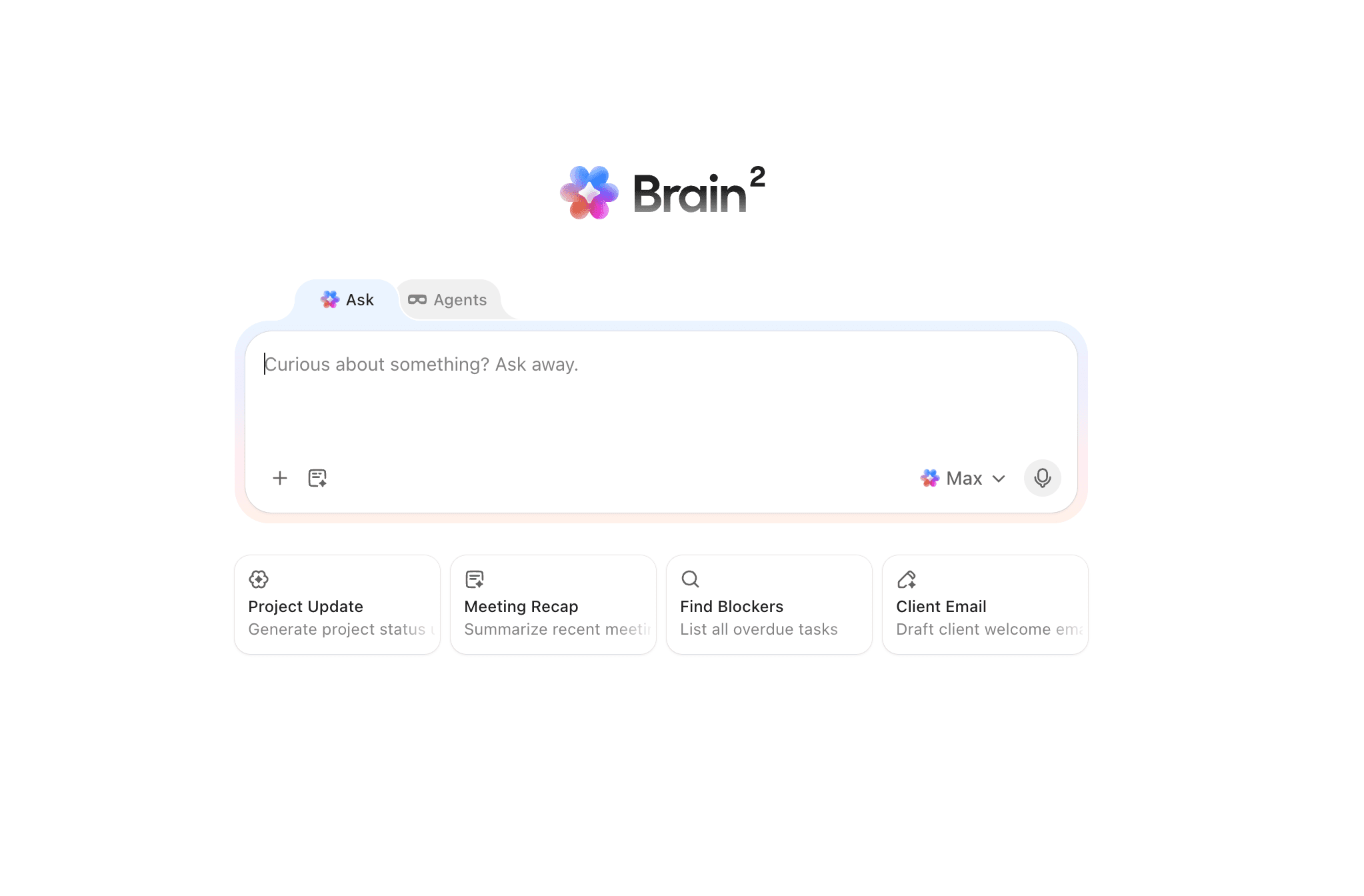
ClickUp Brain2 interface
ClickUp Brain takes a slightly different approach. It sits across tasks, documents, chat, and knowledge management, acting more like an AI workspace assistant. It can answer questions about your workspace, summarise projects, generate content, and help teams find information quickly. For businesses centralising operations inside ClickUp, the ability to query your workspace using natural language can be genuinely useful.
The cost structures also differ. Monday now bundles AI credits into higher-tier plans, adding mandatory cost considerations for larger teams. ClickUp Brain is available as an optional add-on, typically costing around $7–$9 per user per month. Depending on your usage and team size, either model may prove more cost-effective.
In the field
We recently built a Super Agent in 30 minutes that scans retainer tasks weekly and nudges anything with no movement for 7+ days. Immediate ROI, zero code. Monday can't do that natively.
Bottom line: If your team wants AI that makes boards easier to set up and summarises updates, Monday AI Assistant is a strong option. If you want AI that takes autonomous action inside your workspace, scanning tasks, nudging stalled work, creating follow-ups, ClickUp Brain is pulling ahead. But both platforms are evolving so fast that today’s advantage may not last.
Where this can break
The reality is that most businesses still aren't getting significant value from project management AI tools. We've seen teams become excited about AI features during demos only to use them occasionally for meeting summaries or content generation. The technology is improving rapidly, but for most organisations, workspace structure, processes, and team adoption still have a far greater impact on productivity than AI features alone.
Verdict: This category is too close to call definitively. ClickUp Brain is currently ahead on autonomous AI agents, but both platforms are shipping features so rapidly that this gap may close within months. If your business values an AI assistant that can search and reason across tasks, documents, and knowledge, ClickUp Brain has a compelling advantage. If you prefer AI embedded directly into boards and automations with minimal learning curve, Monday AI Assistant may feel more intuitive. We wouldn’t recommend choosing either platform based solely on AI capabilities because both products are evolving too quickly for today’s feature gap to remain meaningful for long.
Which is easier to use and adopt: ClickUp or Monday.com?
Monday.com is easier to use and adopt than ClickUp. Teams typically become productive faster in Monday because the platform is simpler, more visual, and requires far less upfront configuration.
This is one area where we think it's important to be completely honest. Monday.com's interface is incredibly intuitive. Most teams can create boards, assign work, and start managing projects with very little training. It's one of the reasons Monday consistently scores highly for ease of use on review platforms like G2 and Capterra.
ClickUp's learning curve is real. The platform offers significantly more views, hierarchy levels, customisation options, and workflow capabilities than Monday. That flexibility is one of its greatest strengths, but it also means new users can feel overwhelmed initially. Without clear processes and proper onboarding, teams can struggle to understand where information lives and how they're supposed to use the platform.
That doesn't mean ClickUp is difficult forever. In our experience, adoption is heavily influenced by implementation quality. When teams have a well-structured workspace, clear processes, and appropriate training, the learning curve becomes manageable and the long-term payoff is often worth the extra effort.
In the field
Monday wins for best adoption, but if you decide to go with ClickUp, it's all in the set-up.
"Making it easier is really tantamount to getting people using it because most of this data… the UI for it right now is pretty clunky".
Where this can break
Monday.com's simplicity is also its ceiling. We've seen teams adopt it incredibly quickly, only to outgrow it a year later when they needed deeper hierarchy, more sophisticated reporting, or more advanced automations. What feels refreshingly simple at five people can become frustrating at twenty. In many cases, the business hasn't chosen the wrong platform, it has simply outgrown the level of complexity that Monday is designed to handle.
Verdict: If your priority is getting a team productive as quickly as possible with minimal training, Monday.com is the clear winner. If you're willing to invest a few weeks in onboarding in exchange for greater flexibility and scalability, ClickUp's steeper learning curve often delivers a higher long-term payoff. For smaller, non-technical teams, we'd generally recommend Monday. For agencies, operations teams, and businesses expecting significant growth, we'd usually accept the learning curve and choose ClickUp.
ClickUp vs Monday pricing - with clear scenarios
At first glance, the pricing looks fairly similar.
ClickUp Unlimited: $7 per user/month (billed annually)
ClickUp Business: $12 per user/month
Monday Basic: $9 per seat/month
Monday Standard: $12 per seat/month
Monday Pro: $19 per seat/month
However, the real cost differences only become obvious when you model actual teams and the features they need.
Scenario 1: Small agency (5 people)
Needs:
Task management
Client collaboration
Time tracking
Forms
Integrations with Slack and Google Drive
ClickUp
5 users × $7 = $35/month
Includes:
Time tracking
Unlimited integrations
Unlimited forms
Guest permissions
Monday
To get comparable functionality, most agencies would need at least the Pro plan because time tracking is unavailable on Standard.
5 users × $19 = $95/month
Difference: ClickUp costs $60 less per month or $720 less per year.
Winner: ClickUp
Scenario 2: Growing operations team (20 people)
Needs:
Dashboards
Automations
Workload management
Reporting
Multiple departments
ClickUp
20 users × $12 = $240/month
Includes:
Unlimited dashboards
Portfolio reporting
Workload management
Advanced automations
Whiteboards
Mind maps
Monday
20 users × $19 = $380/month
While Monday Pro provides dashboards and automations, some reporting and governance capabilities still require Enterprise upgrades.
Difference: ClickUp costs $140 less per month or $1,680 less per year.
Winner: ClickUp
Scenario 3: Enterprise with external collaborators (100 employees + 50 clients)
Needs:
Internal users
Client access
Advanced permissions
Reporting
Large-scale collaboration
ClickUp
100 users × $12 = $1,200/month
The 50 clients can be invited as guests, meaning many organisations avoid paying for additional full licences.
Approximate annual cost: $14,400
Monday
100 users × $19 = $1,900/month
Monday's licensing model is generally more restrictive around collaborator access, meaning organisations often need additional paid seats or an Enterprise agreement.
Approximate annual cost: $22,800
Difference: Around $8,400 per year before Enterprise pricing negotiations are even considered.
Winner: ClickUp
*Pricing verified June 2026. Monday requires AI credits as additional cost on higher-tier plans.
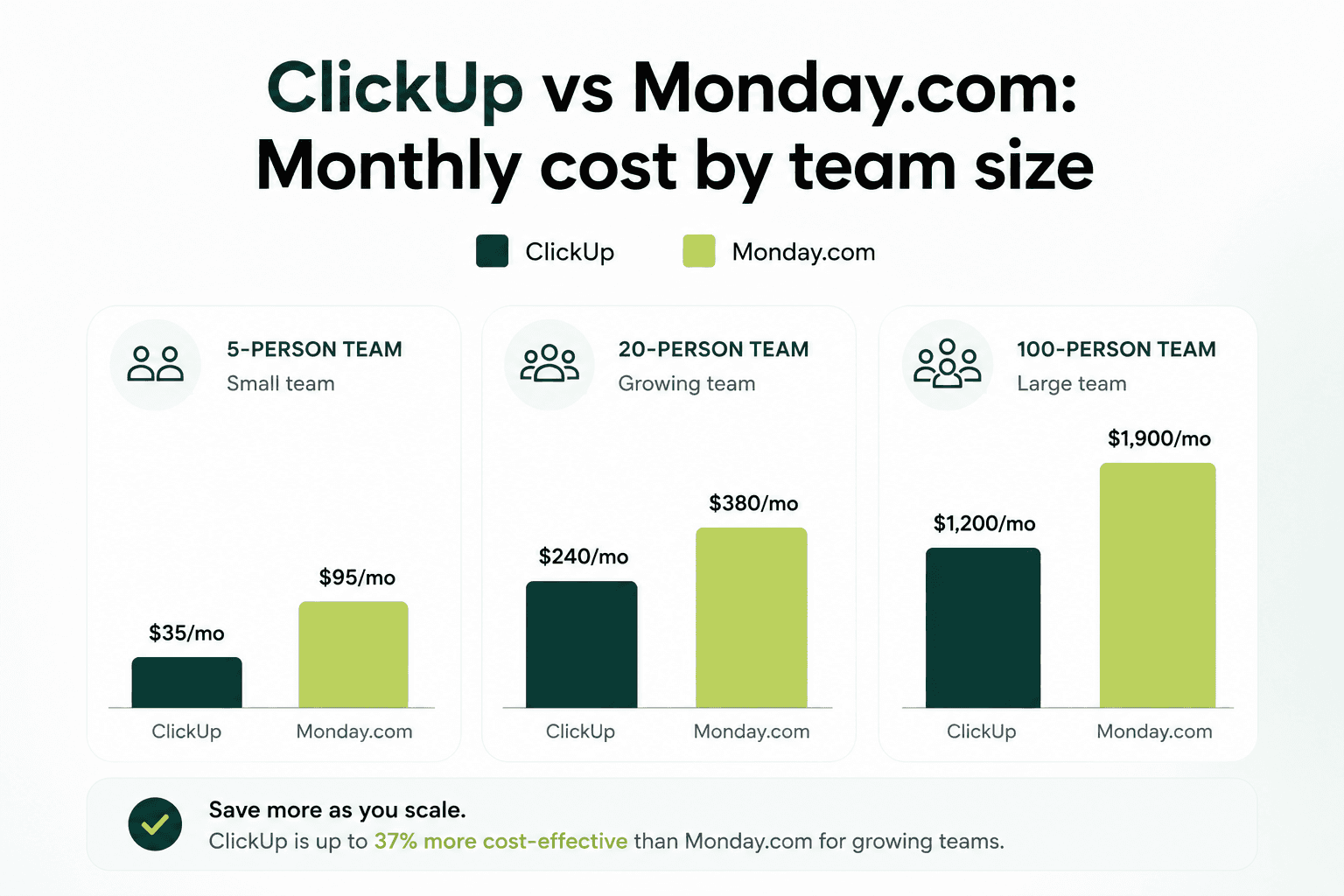
Monday.com vs ClickUp pricing comparison
The hidden costs you need to know about
Software subscription costs are only one part of the equation.
The bigger expense is usually:
Paying for seats that don't need full licences
Upgrading plans to unlock features like time tracking or advanced reporting
Purchasing additional products as your processes become more sophisticated
Rebuilding workflows because the platform can't handle operational complexity
For smaller teams with simple workflows, Monday.com's pricing is perfectly reasonable and its visual interface can be easier to adopt.
But once you start needing dashboards, automations, client collaboration, workload management and cross-functional reporting, ClickUp typically delivers significantly more functionality per dollar spent.
The Sharpflow decision framework
Question | If Yes → | If No → |
Do you run repeatable client workflows with deadline remapping? | ClickUp | Either works |
Does everyone need cross-project visibility? | ClickUp (deeper dashboards) | Monday (simpler boards) |
Is your team over 10 people? | ClickUp (pricing scales better) | Monday is fine |
Are your team technical and quick to adopt new tools? | ClickUp (higher payoff) | Monday for better adoption |
Do you need native time tracking for billing? | ClickUp (non-negotiable) | Either works |
Switching from Monday to ClickUp: The migration
A Monday to ClickUp migration is rarely as simple as exporting your data and importing it into a new workspace. The good news is that most teams can complete the transition in around three to five weeks. The bad news is that the technical migration is usually the easy part. The real work is redesigning processes and getting people comfortable with a completely different way of organising work.
Realistic migration timeline
Week 1: Discovery and process mapping
Document your existing boards, workflows, automations, reports, and pain points. Decide what should be migrated, what should be improved, and what should be left behind.
Week 2: Workspace architecture and build
Design your ClickUp hierarchy, including Spaces, Folders, Lists, statuses, and custom fields. This is where most of the long-term success or failure of the migration is determined.
Week 3: Data migration
Export your data from Monday.com and import it into ClickUp using CSV files or ClickUp's native import tools. Configure views, recreate workflows, and begin testing.
Week 4: Automation build and team building
Rebuild automations, configure dashboards, train users, and refine processes based on feedback.
Week 5 (Optional): Optimisation and adoption
For larger teams, we usually recommend an additional week of optimisation to address adoption issues, refine reporting, and make sure the workspace works in practice rather than just on paper.
What imports cleanly
Most teams are pleasantly surprised by how much data transfers without issue. Typically, you can migrate:
Tasks and items
Task names and descriptions
Assignees
Due dates
Status information
Comments and updates (depending on configuration)
Basic custom field data
Attachments in certain circumstances
For straightforward project data, the migration process is relatively painless.
What doesn't transfer cleanly
This is where many businesses get caught out. Several important elements need to be rebuilt manually, including:
Monday automations
Dashboard configurations
Board-level permissions structures
Certain column types and formulas
Integrations with third-party applications
Reporting setups and executive dashboards
In our experience, rebuilding these elements often takes longer than migrating the actual task data.
The biggest mistakes teams make when migrating solo
1. Trying to replicate
This is the most common mistake we see.
Monday and ClickUp have fundamentally different structures. Trying to recreate every Monday board inside ClickUp usually results in an overly complex workspace that ignores ClickUp's hierarchy and creates unnecessary duplication. The best migrations redesign the system around how ClickUp actually works.
2. Migrating without mapping
Many teams assume their existing setup simply needs rebuilding elsewhere. In reality, migrations are the perfect opportunity to simplify processes, remove workarounds, and eliminate years of operational clutter.
Otherwise, you're simply moving the same problems into a new platform.
3. Not training properly
Even perfectly built workspaces fail if nobody knows how to use them. ClickUp's flexibility means adoption cannot be left to chance.
We've seen businesses spend weeks building excellent workspaces only to see usage collapse within two months because teams weren't properly trained on where information lives and how work should flow through the system.
Our advice
A successful Monday.com to ClickUp migration is less about moving data and more about designing better systems. The businesses that get the most value from ClickUp treat migration as an opportunity to rethink how work happens rather than simply changing software.
If you're planning a switch, we've put together a free Monday to ClickUp Migration Checklist that covers every stage of the process. And if you'd like a second opinion before you start, book a discovery call with our team. We'll map your workflows first and tell you honestly whether migrating is the right move.
ClickUp vs Monday for agencies
For most agencies, we recommend ClickUp. Client-based hierarchy, template date remapping, native time tracking, and dashboard reporting make it exceptionally well suited to repeatable service delivery. Being able to launch a new client project from a template and automatically shift every deadline relative to the start date is a huge operational advantage.
Client example: One digital agency we worked with was manually adjusting dates across every new website project. After moving to ClickUp templates with date remapping, project setup time dropped from around 30 minutes per client to less than five.
See more real client results in our ClickUp case studies.
Monday.com can still work well for very small agencies, particularly teams under five people that prioritise speed and simplicity over operational depth.
ClickUp vs Monday for small business
For small businesses and startups, the answer depends entirely on complexity. If your team is non-technical and simply needs somewhere to assign tasks and track projects, Monday.com is usually easier to adopt. Most teams are productive within a day or two.
However, if you're running repeatable processes with deadlines, approvals, automations, or client work, ClickUp often provides better long-term value. Its free plan is also difficult to ignore, offering unlimited users and unlimited tasks, making it particularly attractive for bootstrapped startups.
Client example: We worked with a seven-person startup that initially wanted Monday.com because it looked simpler. During discovery, we uncovered onboarding processes, recurring client deliverables, and reporting requirements that would have required significant workarounds. ClickUp proved to be the better fit and gave them room to grow without needing another migration a year later.
ClickUp vs Monday.com for ops and professional services
This is where ClickUp clearly pulls ahead. Operations teams often require workload management, cross-department visibility, complex automations, time tracking, and sophisticated reporting. ClickUp's hierarchy and dashboard capabilities make these use cases achievable without stitching together multiple tools.
Monday.com can support operational processes, but we've found that larger service teams often hit limitations around visibility and workflow complexity as they scale.
Client example: One professional services business was managing delivery, customer success, and leadership reporting across separate systems. Consolidating everything into ClickUp allowed them to manage workflows, capacity planning, and reporting from a single workspace, dramatically improving visibility across the business.
ClickUp vs Monday for solopreneurs
For a single person, both platforms are arguably more powerful than you need. Monday.com is faster to set up and easier to understand, making it an attractive option if you simply want somewhere to organise projects and tasks.
ClickUp becomes more appealing if you expect to grow, hire team members, or build repeatable systems that can scale alongside your business. Starting with ClickUp can save a migration later, but it also requires a greater investment of time upfront.
Client example: We've seen freelancers successfully use both platforms. Those focused purely on personal productivity often preferred Monday's simplicity, while consultants and agency founders building processes with future team growth in mind generally gravitated towards ClickUp.
Monday vs ClickUp FAQs
Which is better, ClickUp or Monday.com?
ClickUp for agencies, operations teams, and businesses running complex repeatable workflows. Monday.com for smaller teams under 10 who prioritize speed-to-adoption and visual simplicity. After 100+ implementations, we find the deciding factor is process complexity, not features.
Is ClickUp cheaper than Monday.com?
Yes, significantly at scale. Monday's paid plans require minimum 3 seats and bill in seat increments. AI credits are mandatory on higher tiers. For a 10-person team, ClickUp costs $140 less per month or $1,680 less per year.
Is Monday.com easier to use than ClickUp?
Yes, G2 reviewers consistently praise Monday's intuitive interface. Teams self-onboard without training. ClickUp has a steeper learning curve, but our data shows properly rolled-out teams achieve full adoption in 3-4 weeks, which is a worthwhile trade for the capabilities gained.
Is ClickUp's learning curve really that hard?
It's real but manageable. The #1 complaint on Reddit and review sites is overwhelm. Our honest answer as a ClickUp partner: yes, there's more to learn, but with a structured rollout plan and team training, teams are productive within 3-4 weeks. Without a plan, teams frequently abandon it within 6 months.
Which has better automations, ClickUp or Monday.com?
ClickUp includes significantly more automations at lower price points. ClickUp’s Unlimited plan ($7/user/month) includes far more automation capacity than Monday’s Standard plan ($12/seat/month), which caps at 250 per month. At the Business tier, ClickUp offers up to 10,000 automations per month. Monday.com’s automation builder is easier to set up, but ClickUp delivers substantially better value for growing teams.
Which is better for a small team or startup (under 10 people)?
Depends on complexity. Monday is faster to adopt and simpler to maintain for basic project tracking. ClickUp's free plan (unlimited users and tasks) is unbeatable for budget. If you run repeatable workflows with deadlines, ClickUp pays off quickly. If you need visual boards and speed, Monday wins.
Does ClickUp or Monday.com have a better free plan?
ClickUp, by a wide margin. ClickUp free: unlimited users, unlimited tasks, basic features across all views. Monday free: 2 users max, ~200 items, no automations, no time tracking, no integrations. For any team larger than 2, ClickUp's free plan is significantly more functional.
Can I migrate from Monday.com to ClickUp without losing data?
Partially. Basic task data, assignees, and dates import via CSV. But Monday automations must be rebuilt from scratch, certain column types don't transfer, and dashboard configurations are lost. Realistic timeline: 3-5 weeks for workspace setup and team training. We offer a migration checklist to prevent the most common mistakes.
Does ClickUp slow down with large workspaces?
It ca, this is the #1 honest criticism in reviews. Performance can lag on very large projects, and extensive customisation gets tricky to maintain. The fix is proper workspace architecture from the start: logical hierarchy, consistent naming, and governance rules. This is exactly what we build for clients.
Is ClickUp better than Monday?
After implementing ClickUp for more than 100 teams, including many migrations from Monday.com, our verdict is simple:
ClickUp is the better platform for agencies, operations teams, and businesses running complex, repeatable processes.
Monday.com is the better choice for smaller teams that value speed, simplicity, and visual project management.
The deciding factor isn't features. It's complexity.
The more departments, clients, automations, and workflows you need to manage, the more ClickUp's hierarchy, templates, reporting, and flexibility become valuable.
If your needs are relatively simple and your team wants to get up and running with minimal training, and no outside help from a consultancy, Monday.com is going to be your best bet.
What we'd change about ClickUp
As a ClickUp partner, we'd also be the first to admit that the platform isn't perfect.
The learning curve still needs better guided onboarding for new users. The platform can feel overwhelming when you're presented with dozens of features, views, and configuration options from day one. Performance can also lag in very large, poorly structured workspaces, particularly when years of processes and customisation have accumulated without governance.
The mobile app, while improving, still doesn't match the desktop experience for power users managing complex workflows. And perhaps most importantly, ClickUp simply contains more functionality than some businesses need. If all you want is a straightforward task list and basic project tracking, the sheer number of options can feel like unnecessary complexity.
None of these issues are deal-breakers. They're implementation challenges that can usually be solved with proper workspace design and clear processes. But they're worth acknowledging because no software platform is perfect, and pretending otherwise doesn't help anyone make a better decision.
Ready to make ClickUp work for your team? Book a discovery call and we'll talk about tailoring your ClickUp setup to how your business actually operates.


